Showing posts with label Nokia X2-01. Show all posts

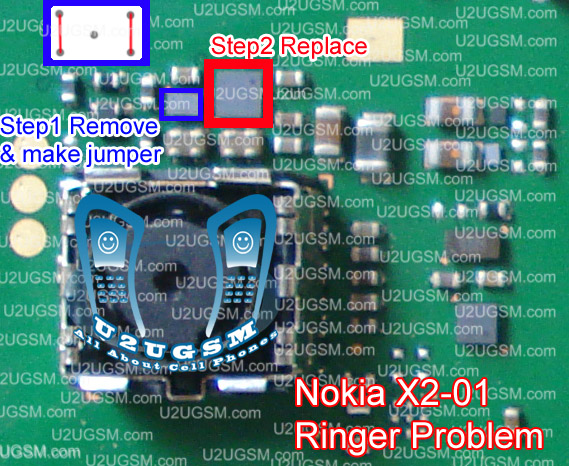
Nokia X201 hand free open problem jumpers solution

Nokia X201 Handsfree problem, hand free singe, hand free open, can be solve with this diagram that I am going to post in this post bellow. look at the diagram and these two ic and there near about area if you find some rust water damage or carbon here you can clean the board and dry it.


Once it is cleaned resold these parts and if problem is not solve remove first ic and make jumpers as defined in diagram and replace 2nd part to solve hand free problem in Nokia X201.
Nokia x201 hand free open problem jumpers solution
for more detail and new tips and tricks about cellphone service problem keep visiting this page we will update cellphone service diagrams timely with new cellphone diagrams. some related post are also given bellow you can read them also for more information about cell phone.
Nokia X201 Insert Sim Problem Solution Jumpers

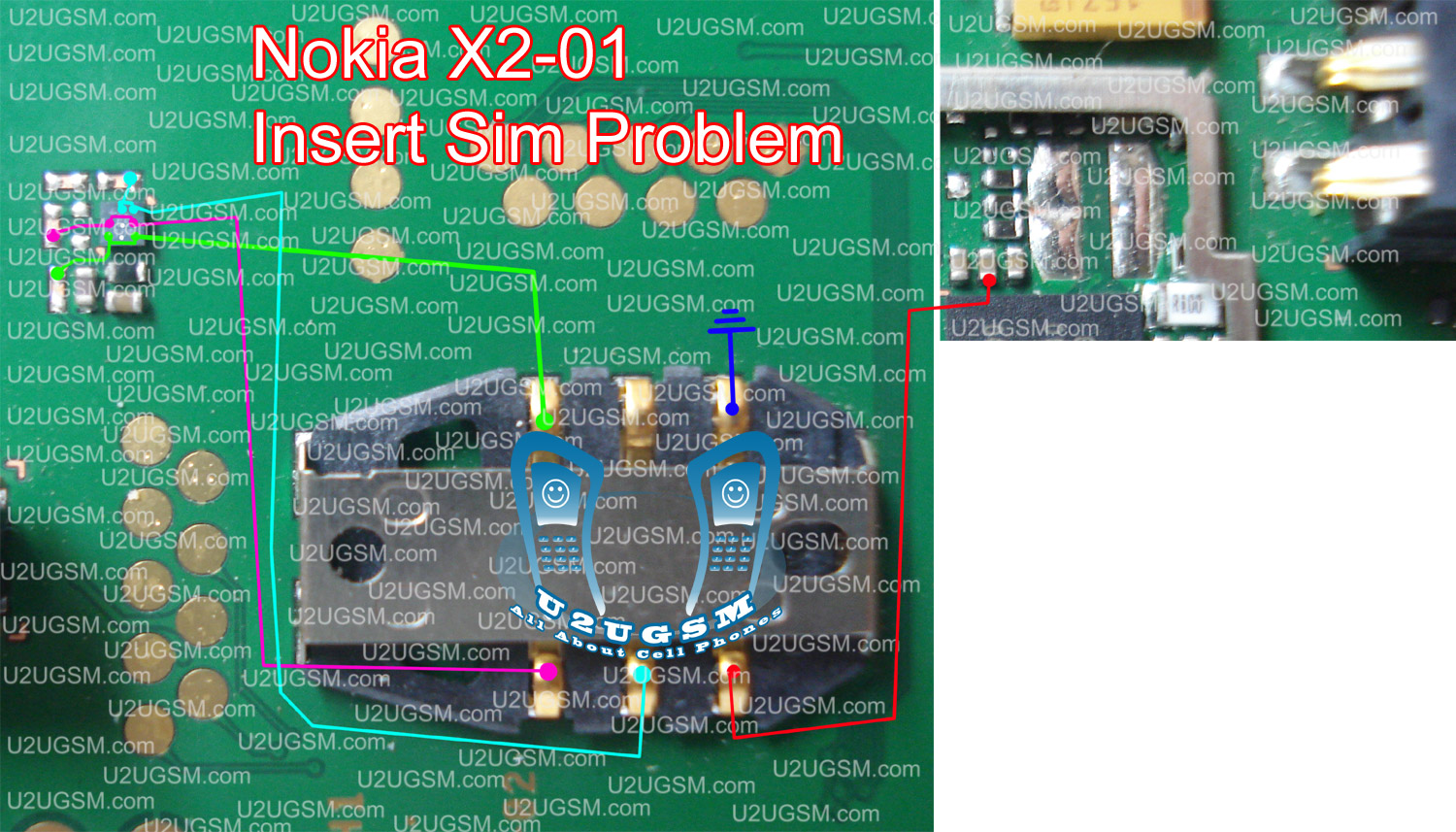
To solve Nokia x201 insert sim problem, Sim not working, Sim Missing All sim related problems can be solve with diagram bellow so look at diagram bellow and follow simple steps given in it.

In above diagram there are a few different colors and all these colors are indicating circuit path of Nokia x201 for insert sim problem solution. So check all these prints and parts with meter and if any of them is missing apply jumper and solve insert sim issue in Nokia x201.

For more detail and new tips and tricks about cellphone service problem keep visiting this page we will update cellphone service diagrams timely with new cellphone diagrams. Some related post are also given bellow you can read them also for more information about cell phone.
Nokia X201 Ringer Problem Solution Jumpers

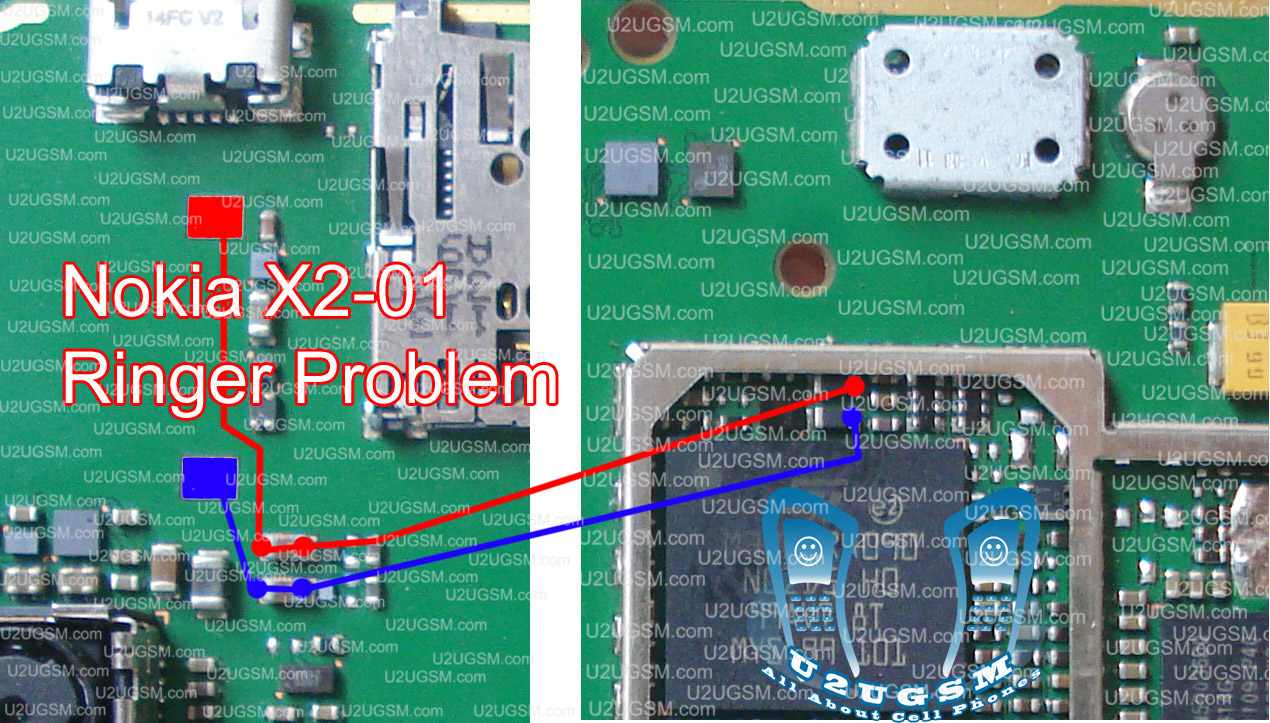
Nokia X201 Ringer Problem, Low Ringer Voice, Ringer not working and many more ringer related faults can be solve with diagram bellow. In this diagram you can see two color line one is blue and other is red.

Both of them is indicating path of circuit and you can follow them if there is any link broken you can apply jumper at those points. And can replace those parts that are infected by rust water damage or due to carbon. It will help you to solve ringer problem in Nokia x201.

For more detail and new tips and tricks about cellphone service problem keep visiting this page we will update cellphone service diagrams timely with new cellphone diagrams. Some related post are also given bellow you can read them also for more information about cell phone.
Nokia X201 On Off Button ways Power Problem

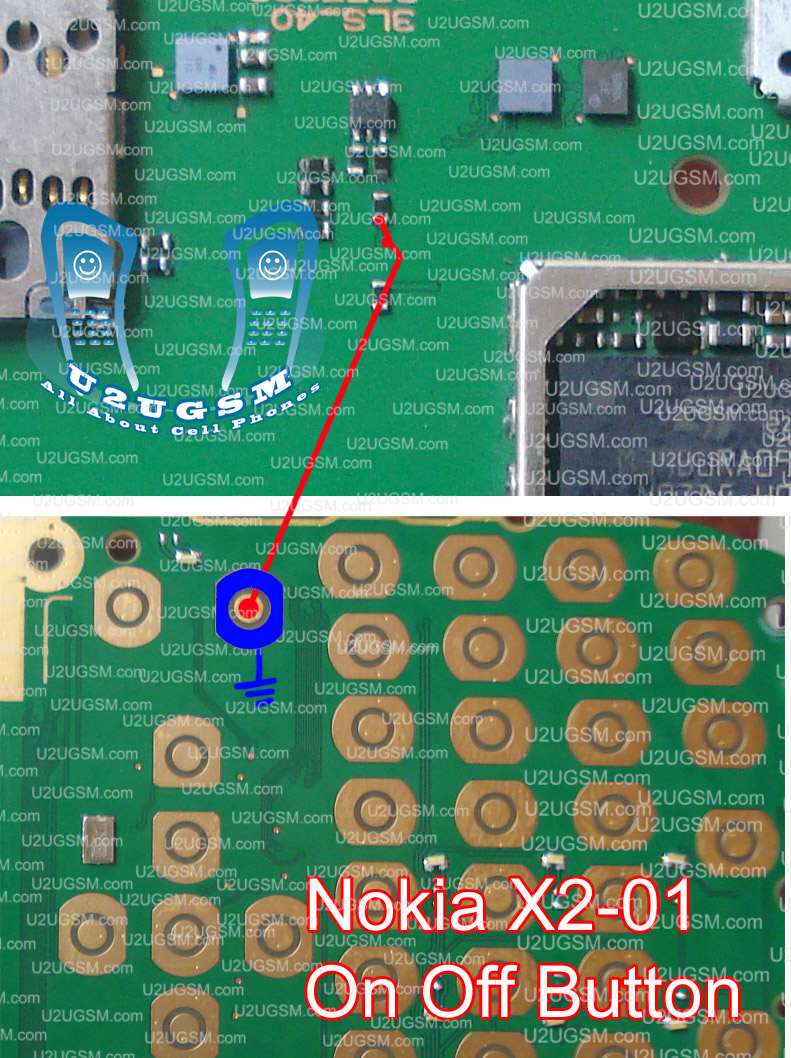
If Nokia X201 Got dead and do not power on but if you plug in charger it shows charging in normal condition it means set is working but power button on of switch is not working. Bellow diagram will teach you how to solve dead problem in Nokia x201 due to power button.

Look at diagram above and make jumpers as shown in diagram outer button is a ground print while inner is going to the point near MMC ic so make jumper at the same point as shown in diagram.

For more detail and new tips and tricks about cellphone service problem keep visiting this page we will update cellphone service diagrams timely with new cellphone diagrams. Some related post are also given bellow you can read them also for more information about cell phone.
Nokia X201 Memory Card Problem Solution

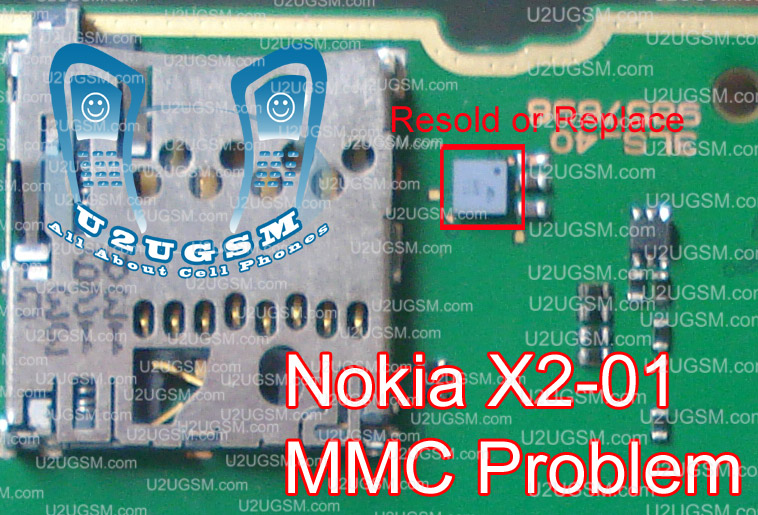
If you are facing MMC (Memory Card) problem in Nokia x201 then this diagram will help you to solve. Look at diagram bellow and this ic that is in red box used for Memory Card functions in Nokia x201.

Clean the board and apply some heat to dry with hot air station. Resold this ic and near about are and if problem do not be solve then change this ic with new one.

For more detail and new tips and tricks about cellphone service problem keep visiting this page we will update cellphone service diagrams timely with new cellphone diagrams. Some related post are also given bellow you can read them also for more information about cell phone.

Nokia X201 Keypad Led Light Problem Jumpers Solution

In Nokia X201 there are eight led lights in keyboard and these can be off due to water damage or rust or carbon. so if you are facing no keypad light and key pad led problem then look at the diagram given bellow it will help you to solve these problems.

Check the light track which Is identified in diagram with different colors and each link shows flow of circuit in Nokia x201 from parts up to the led lights. Check all these tracks with meter and if any of them is braking apply jumpers as given in Nokia x201 light repairing diagram above.

for more detail and new tips and tricks about cellphone service problem keep visiting this page we will update cellphone service diagrams timely with new cellphone diagrams. some related post are also given bellow you can read them also for more information about cell phone.

Nokia X201 Keypad Not Working Problem Solution

In Nokia x201 keypad problem can be due to rust carbon or water damage in this case keypad ic can be damage or keypad track can be missed from any point. for solving keypad problem in Nokia x201 you can see diagram bellow.

In above diagram there are two main dial ic these are used for keypad functions and these are controlling keypad options. In upcoming days I will add a post about keypad track of Nokia x201 that will also help you to see that which keys are linked with each other.

For this post you only can clean the board ic and keypad if there is some rust or carbon. you can resold these two parts and can replace these two ic for keypad problem in Nokia x201.

For more detail and new tips and tricks about cellphone service problem keep visiting this page we will update cellphone service diagrams timely with new cellphone diagrams. Some related post are also given bellow you can read them also for more information about cell phone.
Nokia X201 Mic Problem Jumpers Solution Microphone

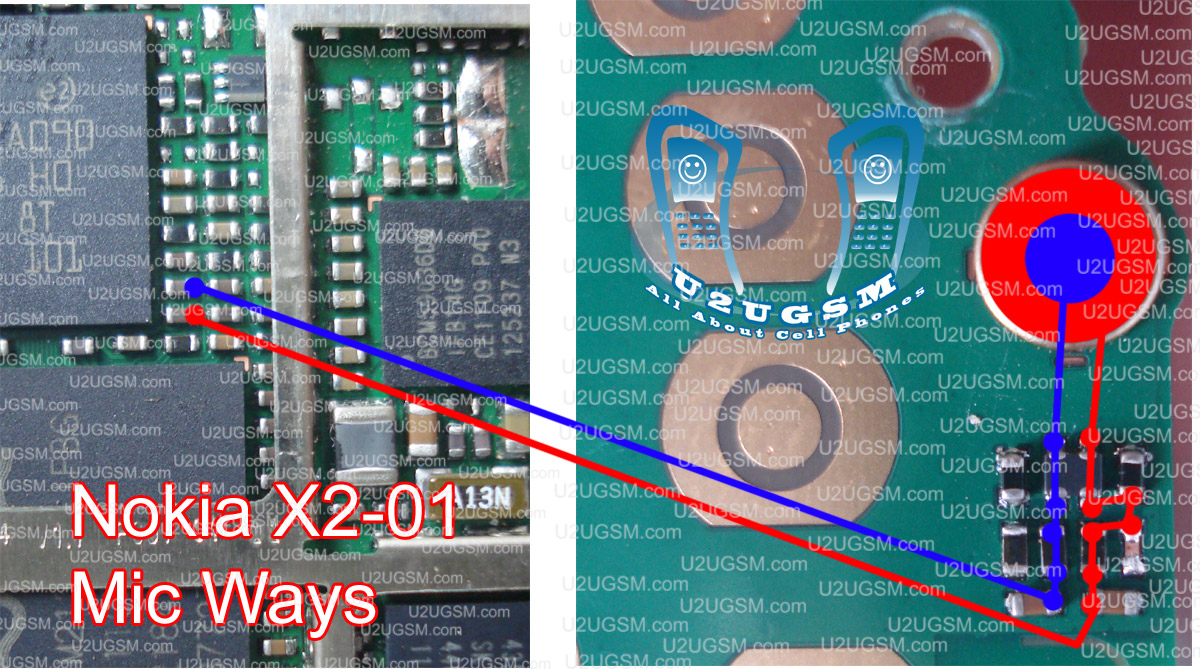
If you have mic problem in Nokia x201, low voice outgoing, no voice is going to next destination mobile, in all these cases this diagram is useful and help full for you to solve mic problem in Nokia x201.

Once you have read this post and look the diagram you will be able to solve Nokia x201 mic problem easily. in first step remove mic and check its point on board if there is a good value then attach new mic and if value is missing then you can check all track which is shown in diagram above. If any link of them is missing you can apply jumper as defined in diagram above.

You can apply jumper where small circles shown in diagram. These circles describe where you can apply jumpers on the board to solve mic problem in Nokia x201.

For more detail and new tips and tricks about cellphone service problem keep visiting this page we will update cellphone service diagrams timely with new cellphone diagrams. Some related post are also given bellow you can read them also for more information about cell phone.
Nokia X201 LCD light Problem Jumpers Solution

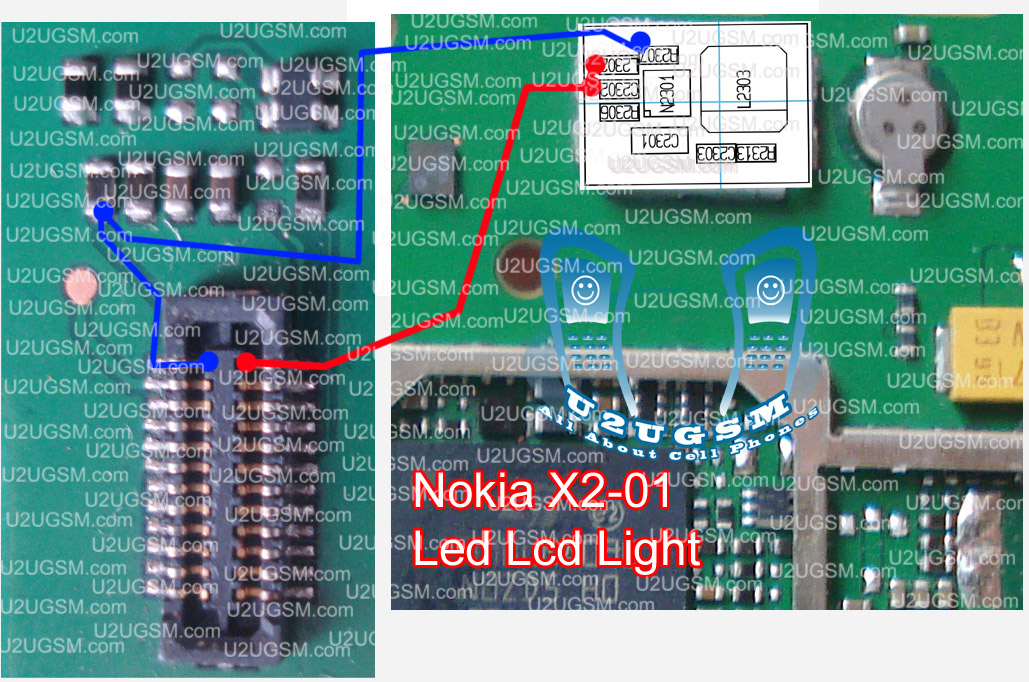
In Nokia x201 LCD light problem display led light problem, display light not working can be solve in a few easy steps that are posted in this post. So read it carefully and see diagram bellow to solve light problem in Nokia x201 LCD display

Check LCD jack and LCD jack on board clean them with electronics cleaner and leave it to dry under electrical bulb or apply some hot air so that it can be dry. Check these two links shown in diagram with different colors and if any of them is broken then please make jumpers to solve light problem in Nokia x201.

For more detail and new tips and tricks about cellphone service problem keep visiting this page we will update cellphone service diagrams timely with new cellphone diagrams. Some related post are also given bellow you can read them also for more information about cell phone.
Nokia X201 Camera Not Ready Problem Jumpers Solution

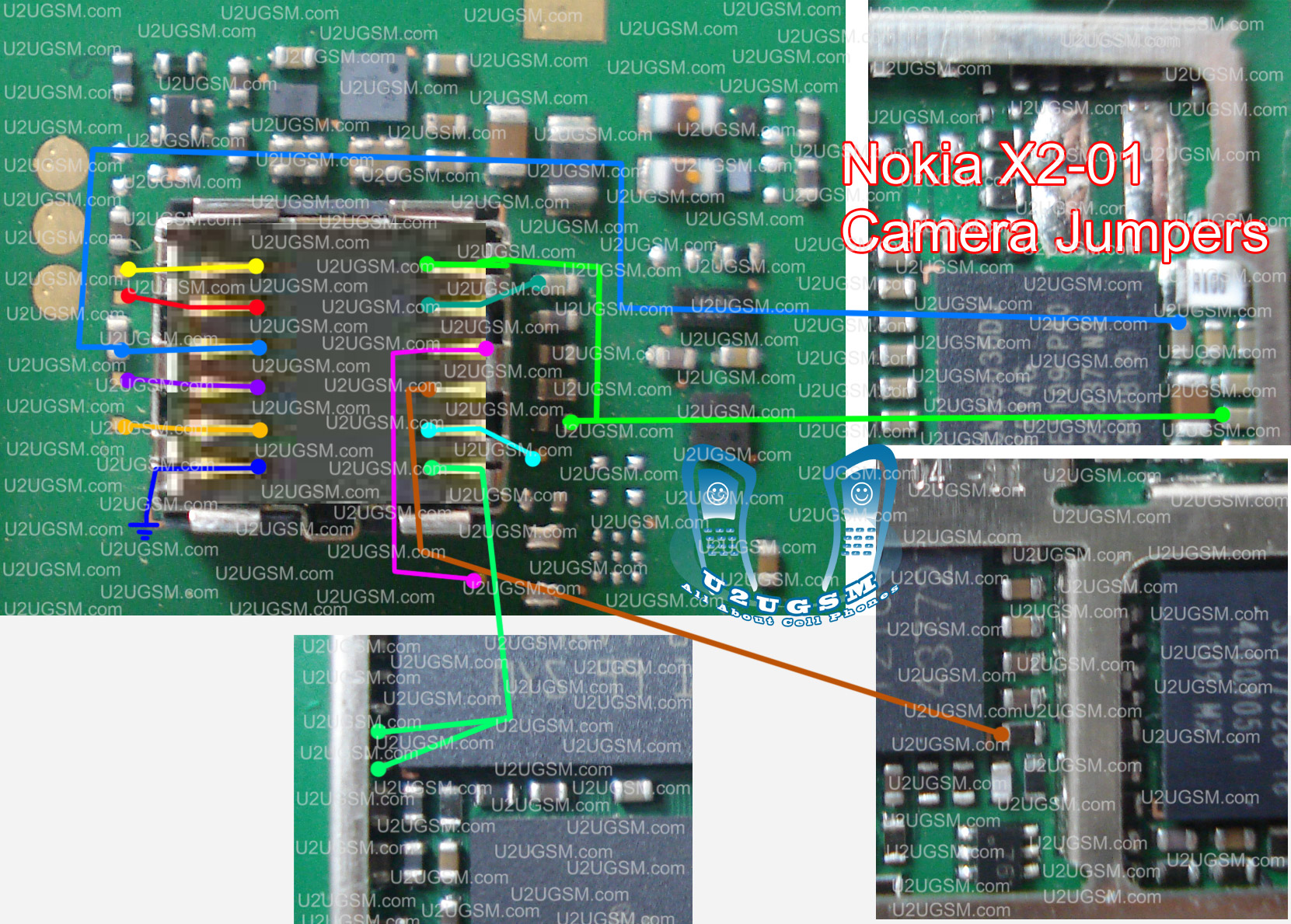
In case you having problem with Nokia x201 camera if camera is not working camera module not ready camera preview error or something else that is about camera problem can be solve with this diagram bellow.


Look at the diagram above very carefully and in it you will find different lines with different colors. These line shows track of camera parts so check all these links with meter and if any or them is broken then make jumper as shown in diagram.

In this diagram small circles show that in these places you can apply jumper and in some cases you can scratch prints and apply jumpers.

for more detail and new tips and tricks about cellphone service problem keep visiting this page we will update cellphone service diagrams timely with new cellphone diagrams. some related post are also given bellow you can read them also for more information about cell phone.
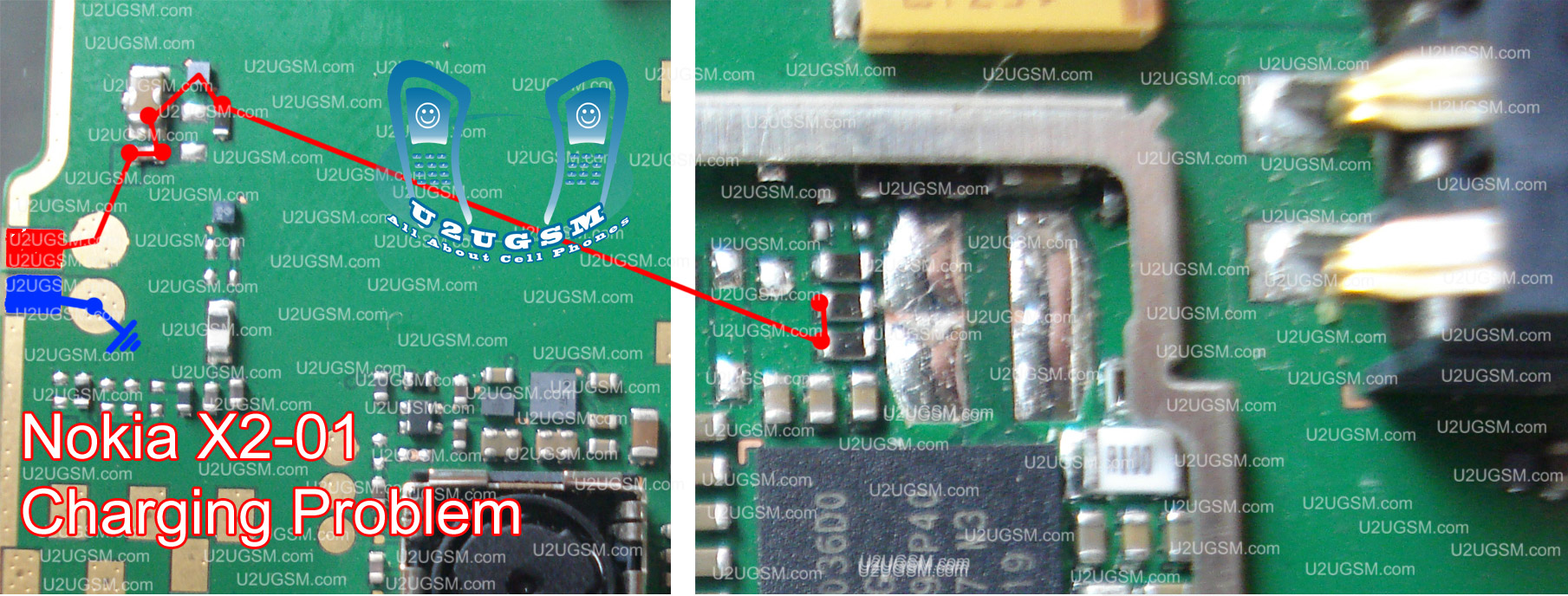
Nokia X201 not Charging Problem Solution Jumpers

If you are facing charging problem in Nokia x201 then this diagram will help you to solve this issue. if you plug-in charger and after a few second It shows not charging or it do not show any indication and not shows charging it can be fault of these parts and you have to check these components that are shown in diagram bellow.


Once you have checked these parts vary carefully clean them if there are some water damage or rust carbon. Check these links with meter and if any link broken make jumpers as shown. blue color print is ground and the red is a +v print. You can apply jumper at any point where a circle is indicated in diagram.

for more detail and new tips and tricks about cellphone service problem keep visiting this page we will update cellphone service diagrams timely with new cellphone diagrams. some related post are also given bellow you can read them also for more information about cell phone.
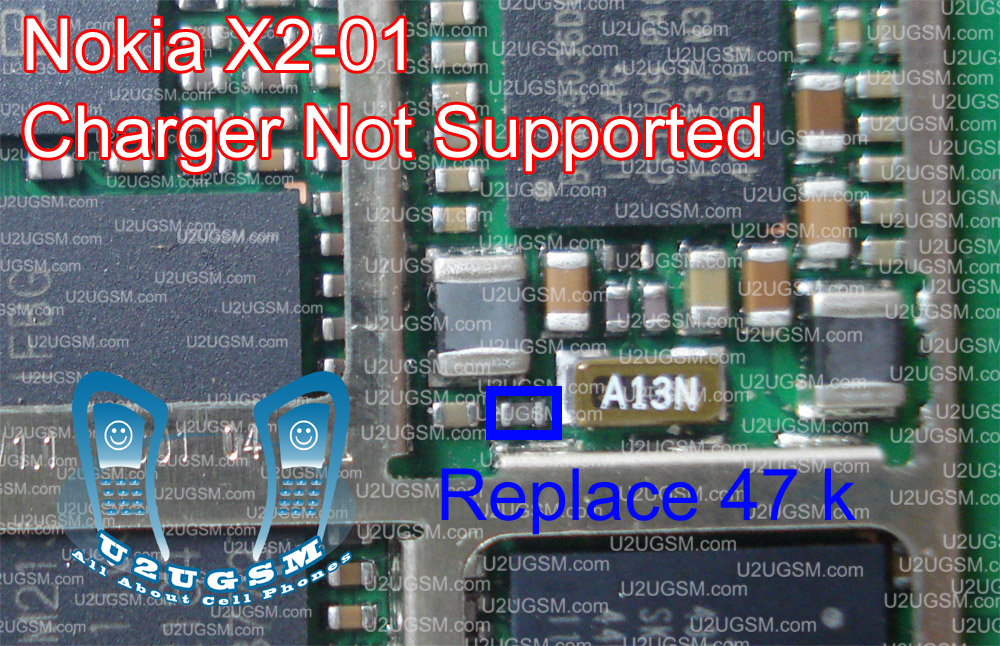
Nokia X201 Charger Not Supported Problem Solution

Some times due to water damage or rust Nokia x201 shows charger not supported when charger is plugged in. so in that case you can check charging track of Nokia x201 which can be find in other post at my site and also check this 47k resistance that is shown in diagram bellow.


After resold check and if it does not work then replace 47k resistance with other one from any Nokia board. for checking location of 47k resistance in different Nokia boards you can search with phrase “charger not supported” and you will find all Nokia boards 47k resistance locations.

for more detail and new tips and tricks about cellphone service problem keep visiting this page we will update cellphone service diagrams timely with new cellphone diagrams. some related post are also given bellow you can read them also for more information about cell phone.
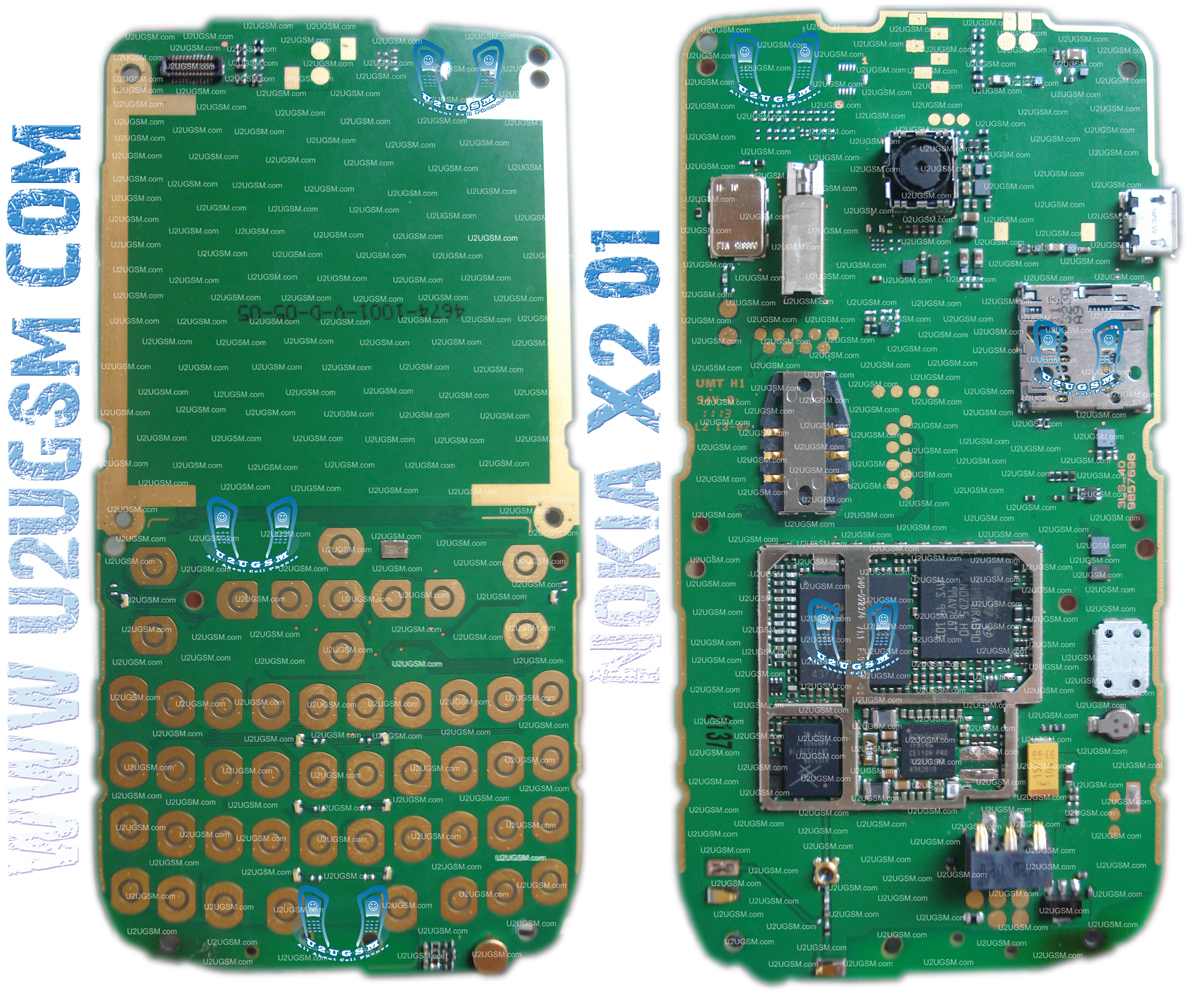
Nokia X2-01 Full PCB Diagram Mother Board Layout


 Nokia X2-01 Full PCB cellphone Diagram Mother Board Layout.
Here is the cellphone diagram of Nokia X2-01 PCB.so i will add some more cellphone diagram in high resolution so that you can add some more repairing trick for


High Resolution


Download High Resolution Diagram of Nokia c2-00


Nokia X2-01 if you find some new repairing techniques please must email me and i will post that diagram with your reference in this way we all make it possible "REPAIRING MADE EASY" the basic point of this blog
Thanks
for more detail and new tips and tricks about cellphone service problem keep visiting this page we will update cellphone service diagrams timely with new cellphone diagrams.some related post are also given bellow you can read them also for more information about cellphone.