Showing posts with label Charging Ways. Show all posts

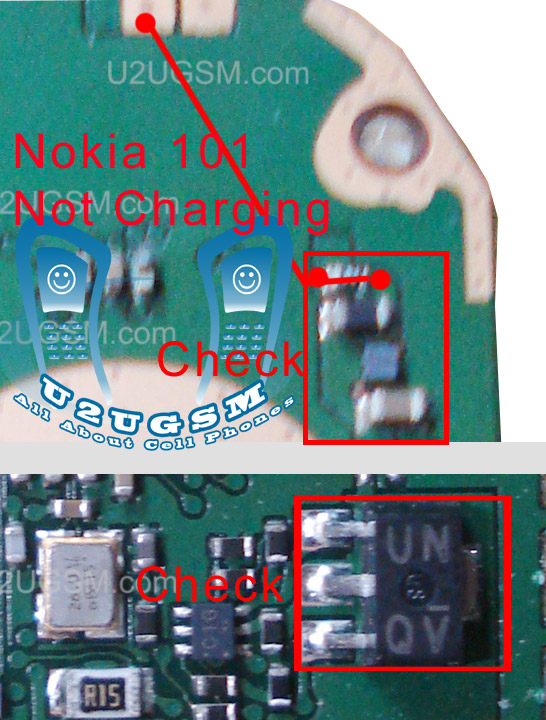
Nokia 100 charging solution

nokia 100 charging solution.nokia 100 charging problem solution
nokia 100 charging
nokia 100 charging jumper solution
nokia x2-00 not charging solution
nokia 100 not charging jumper
samsung GT-E 2130
nokia 100 charging way
nokia 100 charger not supported
nokia 100 charging ic
nokia 100 charging track
nokia 100 charging solution
nokia 100 charging fault
images repair Nokia Not Charging 100
Nokia 100 charging problam
NOKIA 100CHARGING PROBLEM SOLUTION
nokia100 charging prob
repair nokia 100 charger
n 100 charging problem solution
nokia 100 blue print
www nokia 100 charging problem
nokia 101 not charging problem solution video
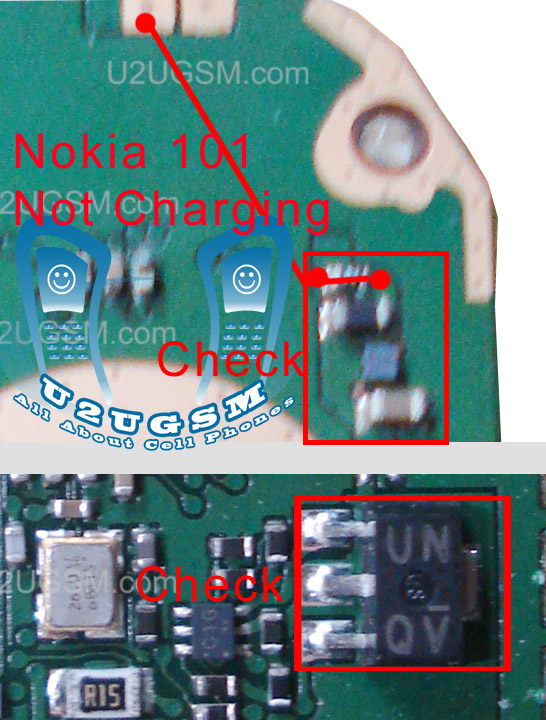
Nokia 100 charging ways

Nokia 100 charging ways are given in this diagram that is posted in this post. So find out these tracks and apply jumpers if any of them is missing.
nokia 100 charging ways
In repairing diagram above you can see blue and red lines. These lines are the path of parts used in charging function.If you find damage or burn parts then replace them to solve Nokia 100 charging problem.

Nokia 111 charger not supported solution

If you are facing Nokia 111 charger not supported problem you can solve it with this diagram. The repairing diagram for Nokia 111 not charging is given bellow in this post. It has some blue and red color lines these lines are given so that you can easily find out main parts that are used in charging function in Nokia 111.
nokia 111 charger not supported solution
Find out parts that are given in above diagram and check them with electronics meter if you find any part missing or damage replace it. You may can apply jumpers as two different color lines are identified.

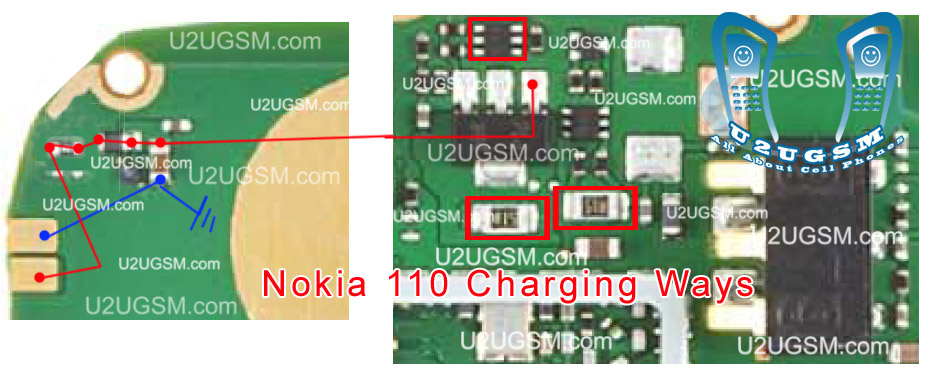
Nokia 110 charger not supported solution

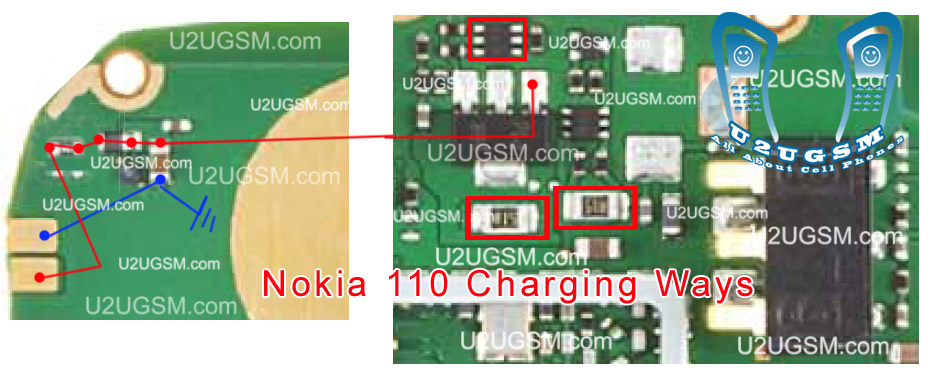
If you are facing Nokia 110 charger not supported problem you can solve it with this diagram. The repairing diagram for Nokia 110 not charging is given bellow in this post. It has some blue and red color lines these lines are given so that you can easily find out main parts that are used in charging function in Nokia 110.
nokia 110 charger not supported solution
Find out parts that are given in above diagram and check them with electronics meter if you find any part missing or damage replace it. You may can apply jumpers as two different color lines are identified.


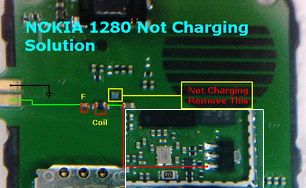
Nokia 1280 not charging problem solution

Nokia 1280 not charging problem solution 1280 not charging Nokia 1280 charging solution Nokia 1280 charging ways Nokia 1280 not charging problem solution Nokia 1280 not charging jumper Nokia 1280 no light problem solution new track ways Nokia 1280 charging not save Nokia 1280 charging ways jumper Nokia 1280 not charging Nokia 1280 not charging solution
nokia 1280 not charging problem solution
so check all these parts that are indicated in this diagram and also check these links with an electronics meter and if you found any of them broken make these jumpers and also you may have to change these parts if not working with upper tricks. 

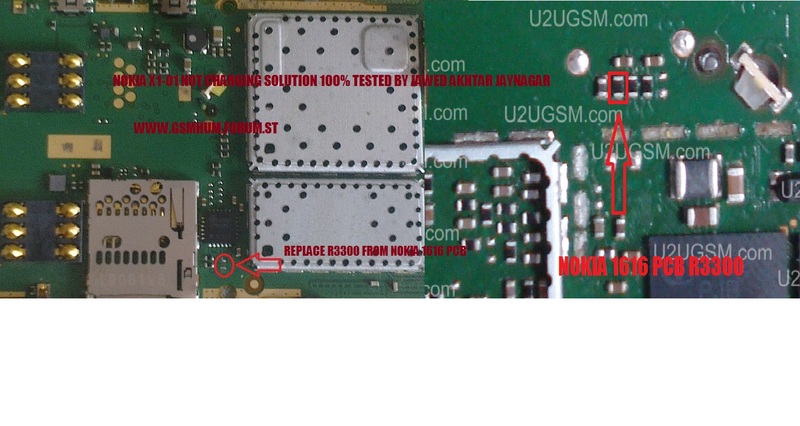
Nokia x101 not charging solution

if you are facing not charging problem in Nokia x101 it can be solve in a few easy steps.Let we diagnose it before solving the problem.Insert charging pin into the mobile phone’s charging base and check the notifications on screen.
nokia x101 not charging solution
If it shows nothing on the screen it may can be cause of charger or it can be due to charging pin damages.While if it shows not charging on the screen it can be the problem of charging ic and parts.
As in above diagram you can see some parts inline with red color to solve Nokia x101 charging problem. Look at the above diagram and in it follow steps given on the diagram. 

Nokia X2-02 Not Charging Problem Solution Jumper Ways

If we plug in charger into charging pin of Nokia X2-02 and show no notification on its screen. It will be cause of missing components or damages of charging pin, parts.
Nokia X2-02 Not Charging Problem Solution Jumper Ways
If notification on the screen of Nokia X2-02 will be about charger not supported it can be problem of charger not supported. And if notification displays about not charging. It can be the problem of water damages of may be due to in proper values of parts that are used in charging function of Nokia X2-02.

After disassemble of Nokia X2-02 look at the motherboard for rust carbon or burned parts. If you found some rust or carbon apply electronics cleaner on the mother board and apply hot air to make it dry proper.

Applying too much heat can damage the mother board and parts.It also can be harm for your skin.So keep in mind about normal heat flow when making it dry.

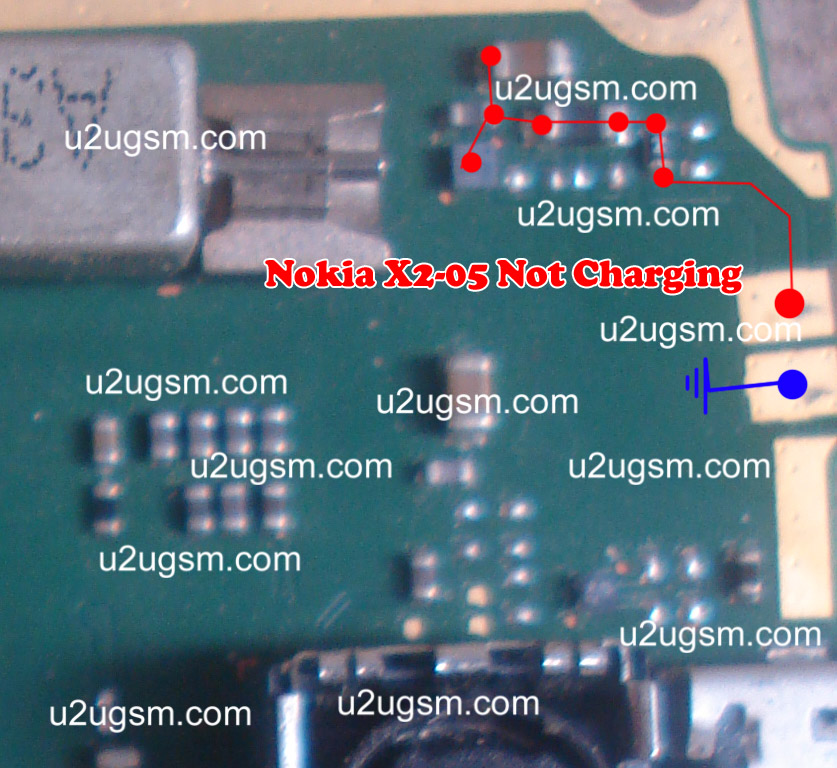
In above diagram a red line bar is used to identify parts and ways that are used in solution of not charging in Nokia X2-02. Once you track these parts with meter apply jumpers if any of them is missing, damage or giving improper values. While the blue line is used for negative point of the charging base. 

Nokia X2-05 Not Charging Problem Solution Jumper Ways

If we plug in charger into charging pin of Nokia X2-05 and show no notification on its screen. It will be cause of missing components or damages of charging pin, parts.
Nokia X2-05 Not Charging Problem Solution Jumper Ways
If notification on the screen of Nokia X2-05 will be about charger not supported it can be problem of charger not supported. And if notification displays about not charging. It can be the problem of water damages of may be due to in proper values of parts that are used in charging function of Nokia X2-05.

After disassemble of Nokia X2-05 look at the motherboard for rust carbon or burned parts. If you found some rust or carbon apply electronics cleaner on the mother board and apply hot air to make it dry proper.

Applying too much heat can damage the mother board and parts.It also can be harm for your skin.So keep in mind about normal heat flow when making it dry.

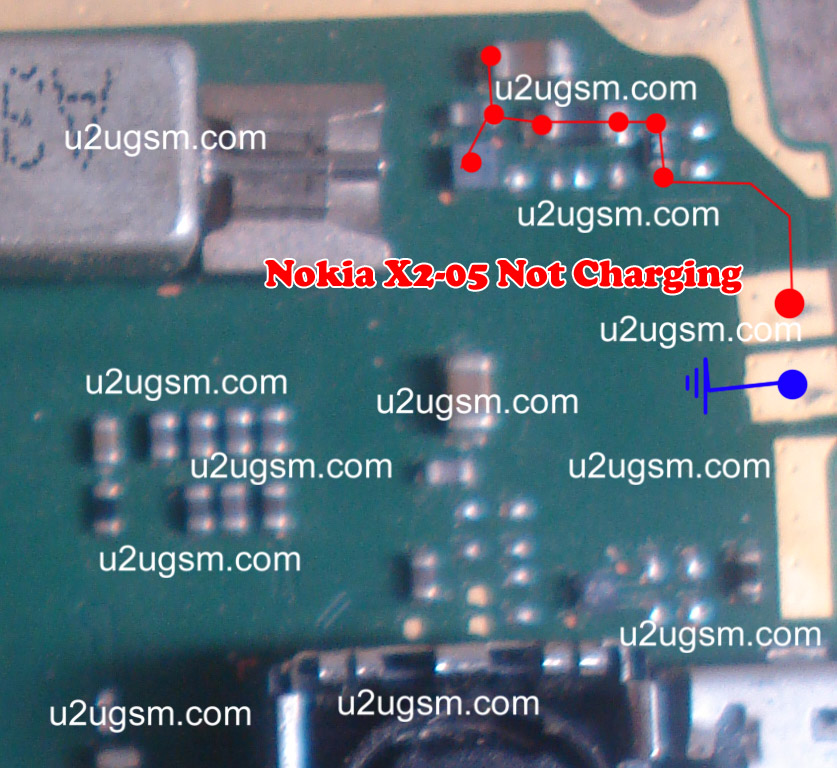
In above diagram a red line bar is used to identify parts and ways that are used in solution of not charging in Nokia X2-05. Once you track these parts with meter apply jumpers if any of them is missing, damage or giving improper values. While the blue line is used for negative point of the charging base. 

Nokia Asha 203 USB Not Charging Problem Solution Jumper Ways

If Nokia asha 203 is not charging with USB or USB can not be detected it can be cause of water damages. Carbon in USB base. Broken or damage parts and may be due to burn components.To solve USB not charging in Nokia asha 203 you can read this post which also contains a USB not charging repairing diagram for Nokia asha 203.
Nokia Asha 203 Usb Not Charging Problem Solution Jumper Ways
In above diagram you can see Red, Blue & Black lines these are used in USB charging and USB data functions. Check USB charging jack if it have some carbon or rust then clean it with CTC and apply heat to make it Dry.
If USB charging jack of Nokia asha 203 is damage or Replace it. If a few pins are missing then check all these tracks that are given in above Nokia asha 203 USB not charging diagram. If any print out of these is missing apply jumpers.

Check all these parts and if any of them is broken or damage apply jumpers. If jumpers can not solve USB data & charging problem of Nokia asha 203 then replace these parts.
for more detail and new tips and tricks about cellphone service problem keep visiting this page we will update cellphone service diagrams timely with new cellphone diagrams.some related post are also given bellow you can read them also for more information about cellphone.

Nokia Asha 203 Not charging problem solution jumpers

When you plugin charging pin into Nokia Asha 203 charging jack. And it show notification not charging it can be fault of missing or non proper values of components. If there is nothing any notification then it can be fault of damage charging pin or damage parts.
Nokia Asha 203 Not charging problem solution jumpers
In above diagram you can see red line that is used for charging tracks. Once you find out these parts. Clean mother board with electronic cleaner and apply hot air to make it dry. Much heat can damage the mother board and it can be harm for your skin also.
Check all these tracks and if any of them is missing apply jumpers as given in diagram to repair Nokia Asha 203 charging problem.
for more detail and new tips and tricks about cellphone service problem keep visiting this page we will update cellphone service diagrams timely with new cellphone diagrams.some related post are also given bellow you can read them also for more information about cellphone.

Nokia C5-06 USB not charging Not detect problem solution jumpers

If Nokia C5-06 is not charging with USB or USB data cable can not detect. This problem can be cause of water damages carbon or burner. And may be due to USB jack damages.
Nokia C5-06 USB not charging Not detect problem solution jumpers
After disassemble of Nokia C5-06 look at mother board and If you found some rust carbon or water damages then it can also be cause of Nokia C5-06 USB problem to solve and fix USB problem in Nokia C5-06 clean all the rust and carbon with electronics cleaner and apply hot air to make it dry.

In above diagram some different color lines are given to identify paths and tracks that are used for USB charging and USB data transfer in Nokia C5-06.Check all these paths tracks and parts components with meter. If any of them is missing apply jumpers as given in diagram.

for more detail and new tips and tricks about cellphone service problem keep visiting this page we will update cellphone service diagrams timely with new cellphone diagrams.some related post are also given bellow you can read them also for more information about cellphone.

Nokia Asha 202 USB Not Charging Problem Solution Jumper Ways

If Nokia asha 202 is not charging with USB or USB can not be detected it can be cause of water damages. Carbon in USB base. Broken or damage parts and may be due to burn components.To solve USB not charging in Nokia asha 202 you can read this post which also contains a USB not charging repairing diagram for Nokia asha 202.
Nokia Asha 202 Usb Not Charging Problem Solution Jumper Ways
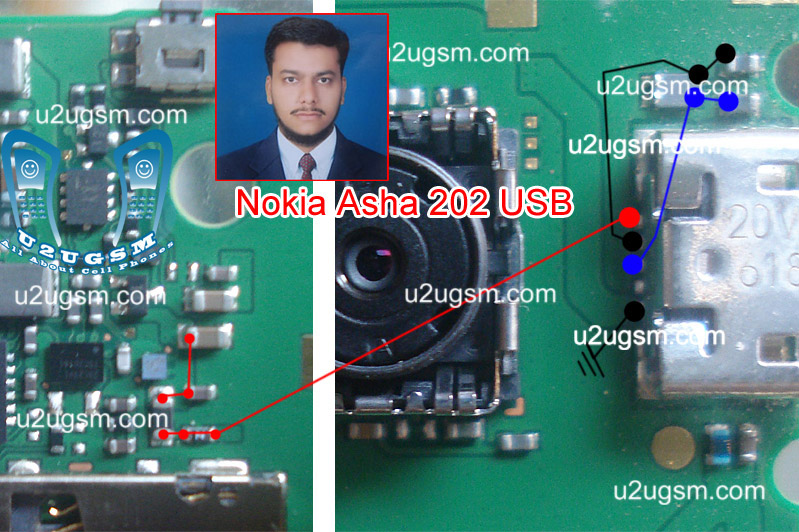
In above diagram you can see Red, Blue & Black lines these are used in USB charging and USB data functions. Check USB charging jack if it have some carbon or rust then clean it with CTC and apply heat to make it Dry.
If USB charging jack of Nokia asha 202 is damage or Replace it. If a few pins are missing then check all these tracks that are given in above Nokia asha 202 USB not charging diagram. If any print out of these is missing apply jumpers.

Check all these parts and if any of them is broken or damage apply jumpers. If jumpers can not solve USB data & charging problem of Nokia asha 202 then replace these parts.
for more detail and new tips and tricks about cellphone service problem keep visiting this page we will update cellphone service diagrams timely with new cellphone diagrams.some related post are also given bellow you can read them also for more information about cellphone.

Nokia C5-06 Not Charging Problem Solution Jumpers

If we want to solve not charging problem in Nokia C5-06 this diagram will help us to solve and fix this problem of charging in Nokia C5-06.
Nokia C5-06 Not Charging Problem Solution Jumpers
In this diagram red color line is to identify that charging path of Nokia C5-06.In solution of charging problem of Nokia C5-06 we have to check a few things as given bellow.

Plug in charger into Nokia C5-06 charging pin.
If it did not show any notification it can be fault of charging pin. Fault of charger or due to some missing components.
If shows not charging notification it can be cause of values of components.

So after disassemble of Nokia C5-06 check all these things which are given above to solve not charging problem in Nokia C5-06.

This diagram is sent to us by one of our guest poster and it is taken from gem-flash a gsm portal.

for more detail and new tips and tricks about cellphone service problem keep visiting this page we will update cellphone service diagrams timely with new cellphone diagrams.some related post are also given bellow you can read them also for more information about cellphone.

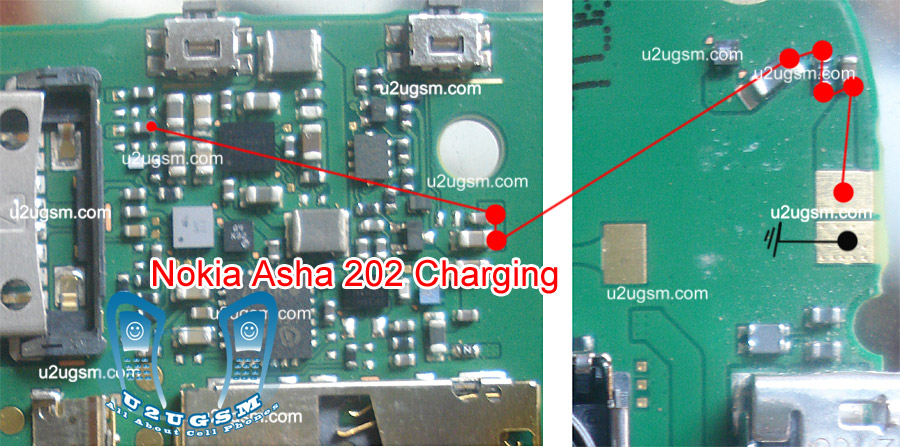
Nokia Asha 202 Not charging problem solution jumpers

When you plugin charging pin into Nokia Asha 202 charging jack. And it show notification not charging it can be fault of missing or non proper values of components. If there is nothing any notification then it can be fault of damage charging pin or damage parts.
Nokia Asha 202 Not charging problem solution jumpers
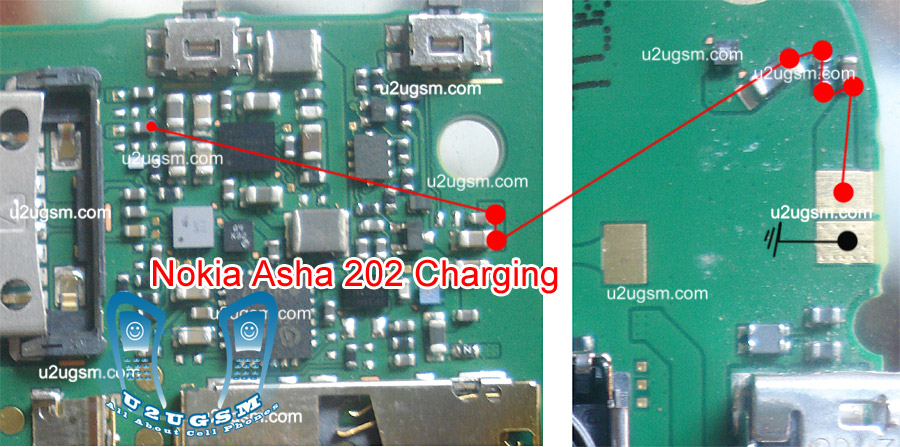
In above diagram you can see red line that is used for charging tracks. Once you find out these parts. Clean mother board with electronic cleaner and apply hot air to make it dry. Much heat can damage the mother board and it can be harm for your skin also.
Check all these tracks and if any of them is missing apply jumpers as given in diagram to repair Nokia Asha 202 charging problem.
for more detail and new tips and tricks about cellphone service problem keep visiting this page we will update cellphone service diagrams timely with new cellphone diagrams.some related post are also given bellow you can read them also for more information about cellphone.

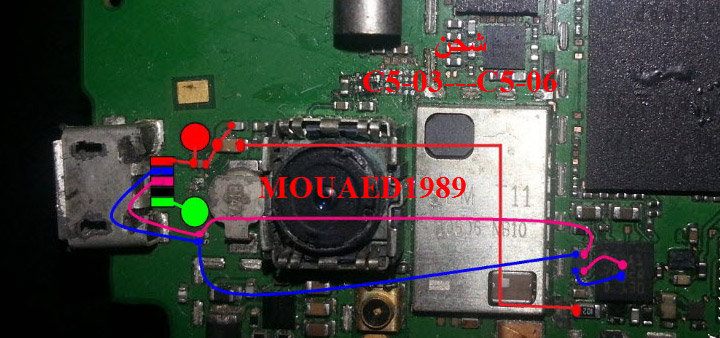
Nokia C5-03 USB not charging Not detect problem solution jumpers

If Nokia C5-03 is not charging with USB or USB data cable can not detect. This problem can be cause of water damages carbon or burn. And may be due to USB jack damages.
Nokia C5-03 USB not charging Not detect problem solution jumpers
After dis assemble of Nokia C5-03 look at mother board and If you found some rust carbon or water damages then it can also be cause of Nokia C5-03 USB problem to solve and fix USB problem in Nokia C5-03 clean all the rust and carbon with electronics cleaner and apply hot air to make it dry.

In above diagram some different color lines are given to identify paths and tracks that are used for USB charging and USB data transfer in Nokia C5-03.Check all these paths tracks and parts components with meter. If any of them is missing apply jumpers as given in diagram.

for more detail and new tips and tricks about cellphone service problem keep visiting this page we will update cellphone service diagrams timely with new cellphone diagrams.some related post are also given bellow you can read them also for more information about cellphone.

Nokia C5-03 Not Charging Problem Solution Jumpers

If we want to solve not charging problem in Nokia C5-3 this diagram will help us to solve and fix this problem of charging in Nokia C5-03.
Nokia C5-03 Not Charging Problem Solution Jumpers
In this diagram red color line is to identify that charging path of Nokia C5-03.In solution of charging problem of Nokia C5-03 we have to check a few things as given bellow.

Plug in charger into Nokia C5-03 charging pin.
If it did not show any notification it can be fault of charging pin. Fault of charger or due to some missing components.
If shows not charging notification it can be cause of values of components.

So after dis assemble of Nokia C5-03 check all these things which are given above to solve not charging problem in Nokia C5-03.

This diagram is sent to us by one of our guest poster and it is taken from gem-flash a gsm portal.

for more detail and new tips and tricks about cellphone service problem keep visiting this page we will update cellphone service diagrams timely with new cellphone diagrams.some related post are also given bellow you can read them also for more information about cellphone.

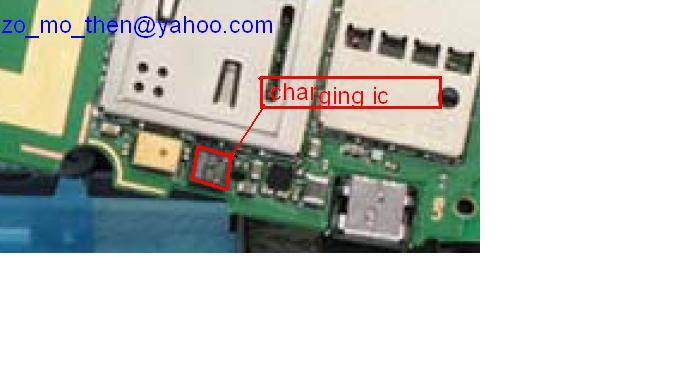
Nokia e52 fake charging solution with Ic

when you plug in charge to charging pin of Nokia e52 and it shows charging indication but do not charge the battery. It can be the fault of charging IC that is given in repairing diagram of Nokia e52 for not charging or fake charging.
Nokia e52 fake charging solution with Ic.
dis assemble the mobile phone and then find out if there is rust water damages or burn and carbon on the smart phone mobile.Clean the mother board with electronics cleaner and apply some heat with hot air to make it dry.

Re sold the Ic and Re flow it. If resoldering can not solve not charging or fake charging problem in Nokia e52 replace this IC that is used for Charging function of Nokia e52.

for more detail and new tips and tricks about cellphone service problem keep visiting this page we will update cellphone service diagrams timely with new cellphone diagrams.some related post are also given bellow you can read them also for more information about cellphone.

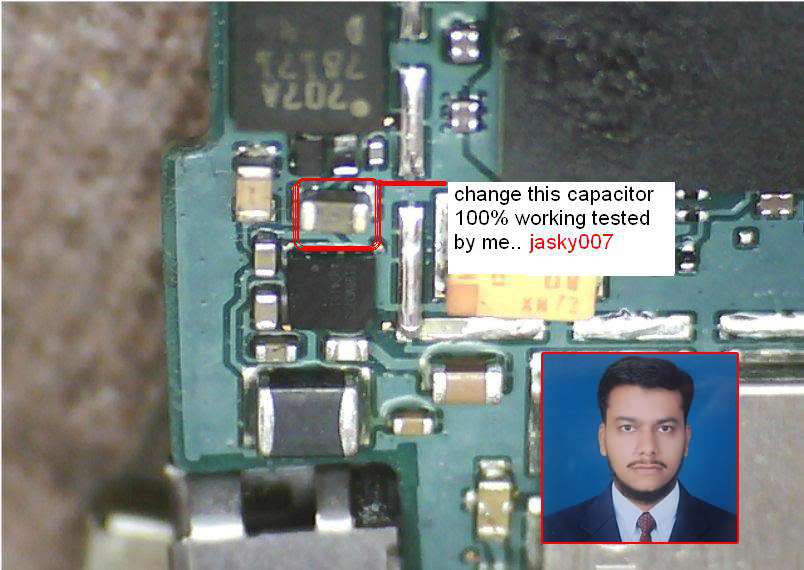
Fake charging solution Nokia e52 100% tested

when you plug in charge to charging pin of Nokia e52 and it shows charging indication but do not charge the battery. It can be the fault of charging IC that is given in repairing diagram of Nokia e52 for not charging or fake charging.
fake charging solution Nokia e52 100 tested
dis assemble the mobile phone and then find out if there is rust water damages or burn and carbon on the smart phone mobile.Clean the mother board with electronics cleaner and apply some heat with hot air to make it dry.

Re sold the Ic and Re flow it. If resoldering can not solve not charging or fake charging problem in Nokia e52 replace this IC that is used for Charging function of Nokia e52.

for more detail and new tips and tricks about cellphone service problem keep visiting this page we will update cellphone service diagrams timely with new cellphone diagrams.some related post are also given bellow you can read them also for more information about cellphone.

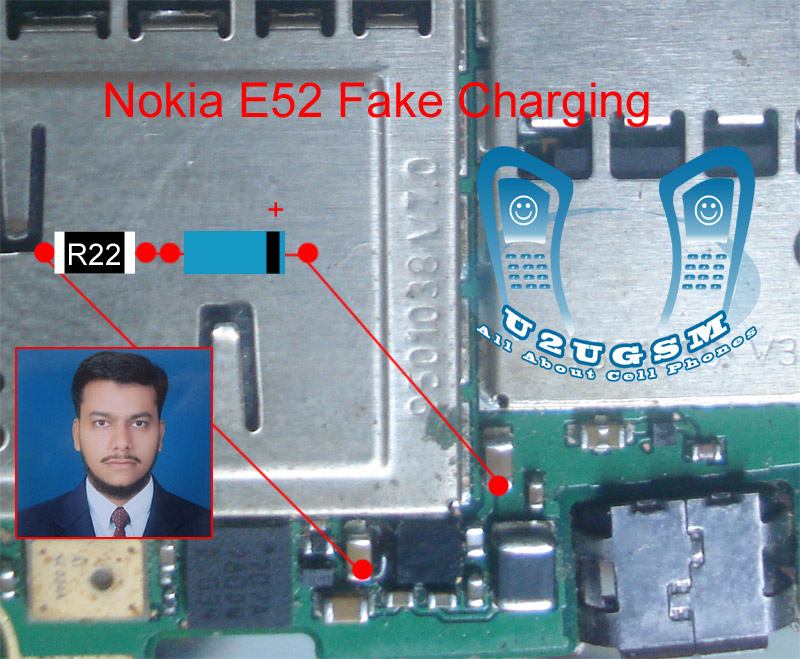
Nokia E52 Not Charging or Fake Charging Solution IC

Nokia E52 not charging problem, Charging IC, Fake Charging. All these problem can be solve with a few basic steps that I am going to teach you here in this post.If you plugin charging pin into charging jack of Nokia E52 and it do not show any notification on screen and start charging also but do not full charge the battery it can be fault charging IC that is used in the mobile phone for charging.
Nokia E52 Not Charging or Fake Charging Solution  IC
So find them and clean these parts with electronics cleaner.So that if there is some rust or carbon that can be clean.Apply hot air to dry it and do not apply much because it can be harm for your skin.

Resold these parts and re flow them can solve fake charging problem in Nokia E52. If it can not solve the issue then replace them to solve fake charging problem in the Nokia Mobile phone.

for more detail and new tips and tricks about cellphone service problem keep visiting this page we will update cellphone service diagrams timely with new cellphone diagrams.some related post are also given bellow you can read them also for more information about cellphone.

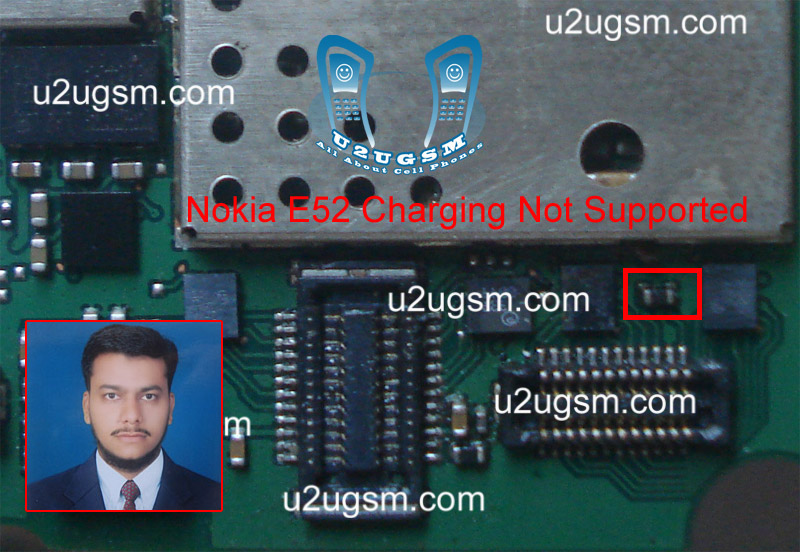
Nokia E52 Charger Not supported Problem solution

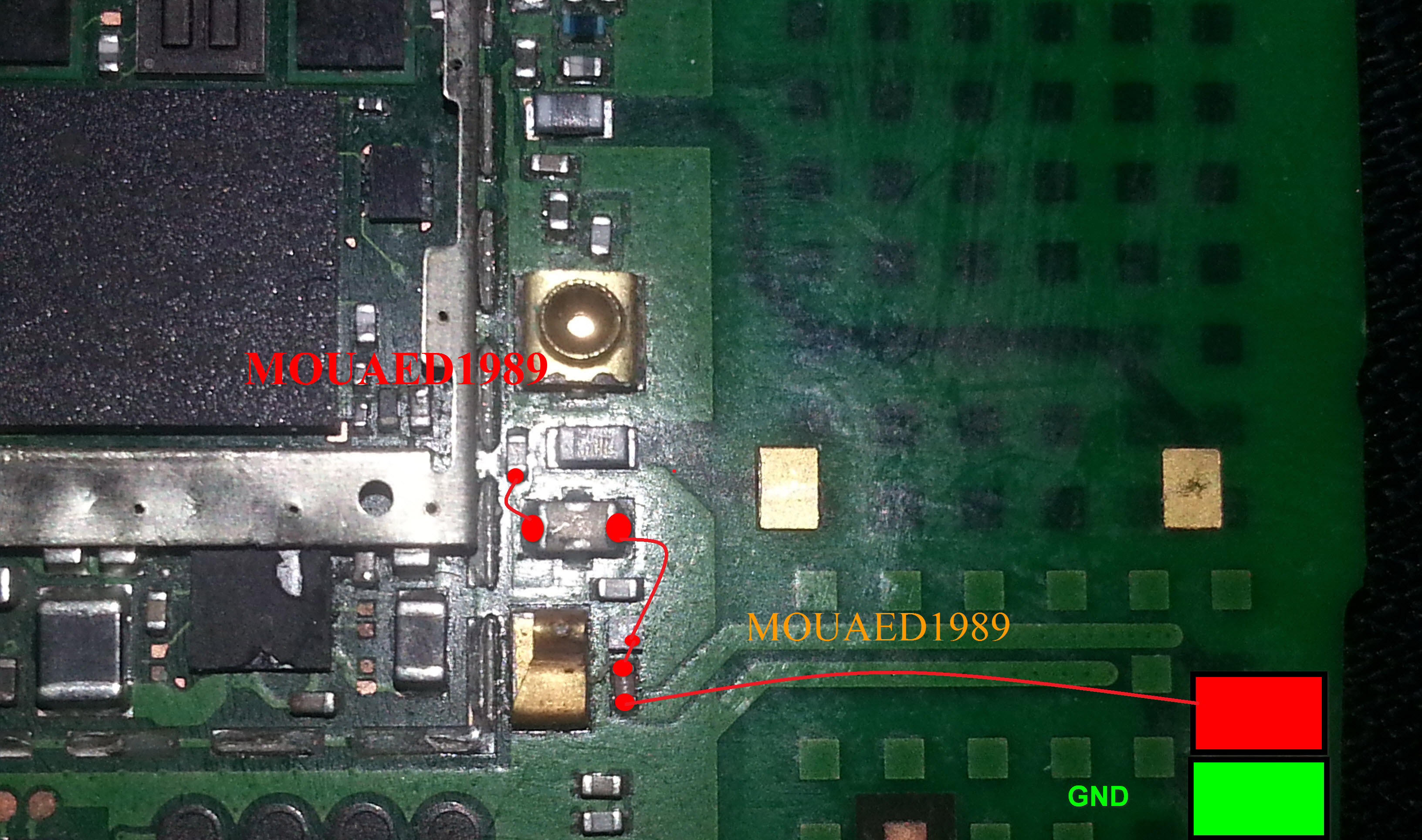
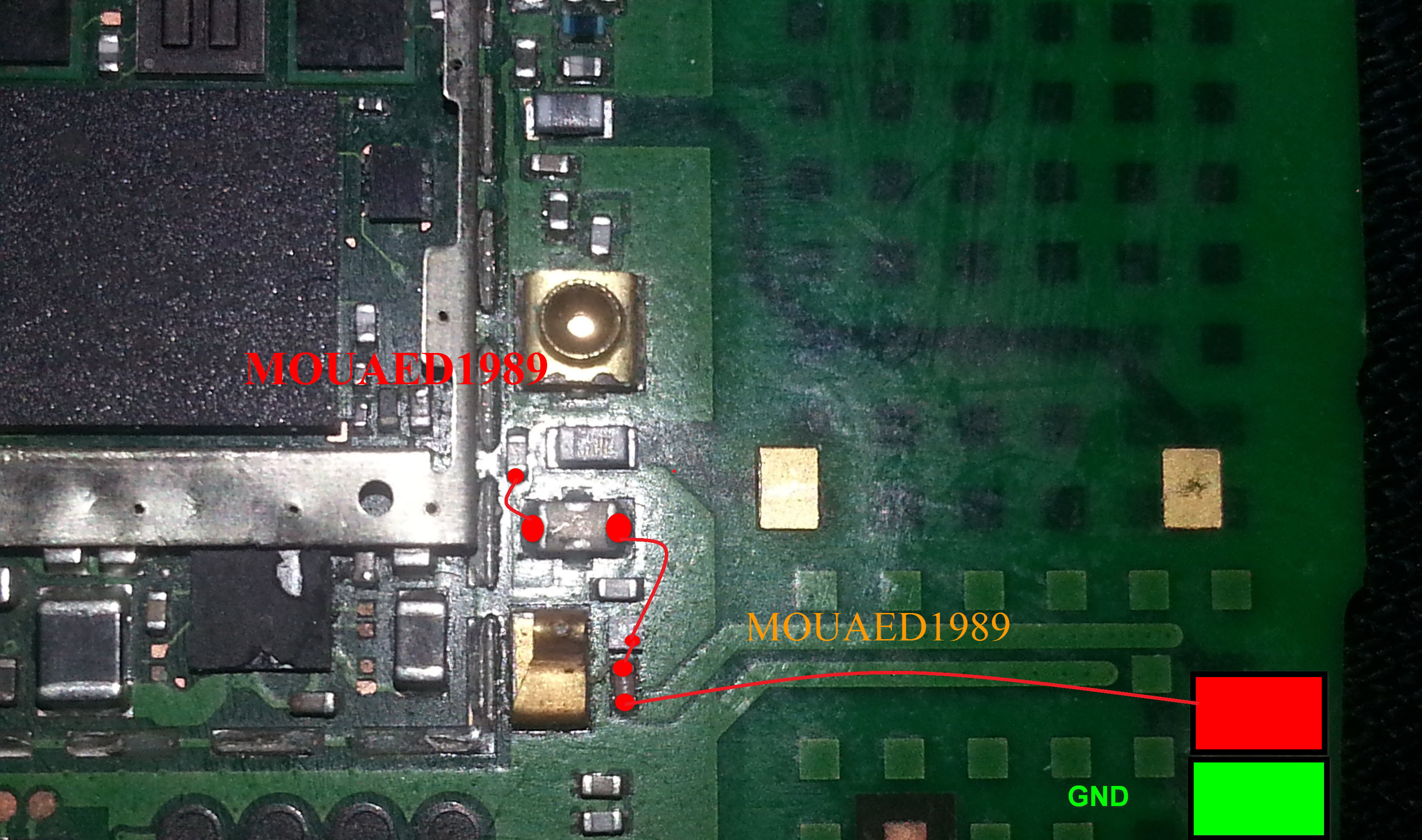
When you plugin the charge into Nokia E52 and it shows notification of Charger not Supported it can be the fault of 47k resistance.In this post I am going to post a diagram that will teach you how to solve charging not supported in Nokia E52 easily.
Nokia E52 Charger Not supported Problem solution
Replacement of battery can solve this problem.And if that can not solve charger not supported problem try same with an other charger.the next step is to disassemble the mobile phone.

In above diagram a resistance is in lined with red color and you can replace it to solve charging not supported in Nokia E52. You can take this resistance from any other board of Nokia E52.

for more detail and new tips and tricks about cellphone service problem keep visiting this page we will update cellphone service diagrams timely with new cellphone diagrams.some related post are also given bellow you can read them also for more information about cellphone.