Showing posts with label Nokia 101. Show all posts

Nokia 101 MMC Problem Solution Jumper Ways Memory Card

Problem:-
MMC (Memory Card) is not working, Memory Card Problem, Insert Memory Card Indication, Memory Card Corrupted.
Nokia 101 MMC Problem Solution Jumper Ways Memory Card
Tools:-
Extra Memory Card for diagnostic.
Nokia Key T4 and T5 for disassemble.
Electronics Cleaner for cleaning carbon or water damages.
Hot air to dry the mother board.
Soldering Iron for applying jumpers.

Solution & Diagnostics:-

Try to solve the problem with inserting new MMC and check. If it is working problem can be solve with MMC only.
If the above step do not solve memory card problem then disassemble the mobile phone and look at the mother board.
If there is some rust or carbon then apply electronics cleaner and clean it.
Apply hot air to make it dry and test again.
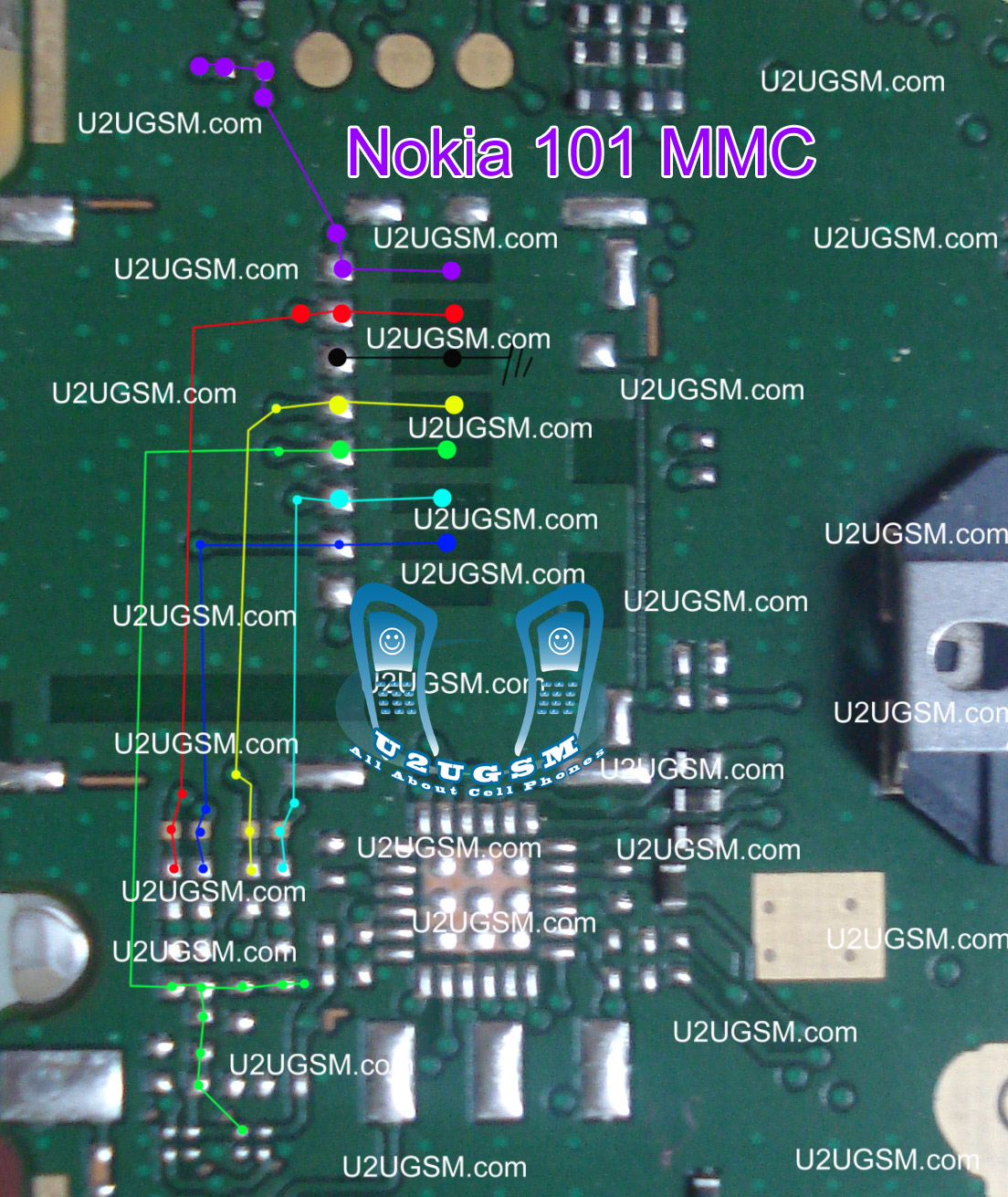
Different color lines are given to indicate whole track and paths of memory card function in Nokia 101.
Check all points that are described in above diagram and if any track out of them is missing apply jumpers as shown in above diagram for solving memory card problem in Nokia 101.
You may have to change MMC ic that is near by the MMC jack.

Warnings & Tips:-
Do not apply much heat with hot air it can be harm for your skin.
Apply jumpers carefully so that it would not be short with other.
After cleaning with cleaner make it dry proper.

for more detail and new tips and tricks about cellphone service problem keep visiting this page we will update cellphone service diagrams timely with new cellphone diagrams.some related post are also given bellow you can read them also for more information about cellphone.

Nokia 101 Ringer Speaker Problem Ways Solution Jumpers

If ringer or speaker is not working in nokia 101 or you are facing low voice or bad quality in it then this diagram will help you to understand the problem and solve it. check diagram given bellow and follow steps that are shown in it.

In diagram you can see parrot and pink colors that are identifying ringer and speaker path. so check these paths with Multi Miter and if any of them is broken then make jumpers as shown in diagram above. a big round point shows here you can make jumper and these are test points for ringer speaker problem. low ringer, low speaker.

for more detail and new tips and tricks about cellphone service problem keep visiting this page we will update cellphone service diagrams timely with new cellphone diagrams.some related post are also given bellow you can read them also for more information about cellphone.
Nokia 101 Network problem single solution ways

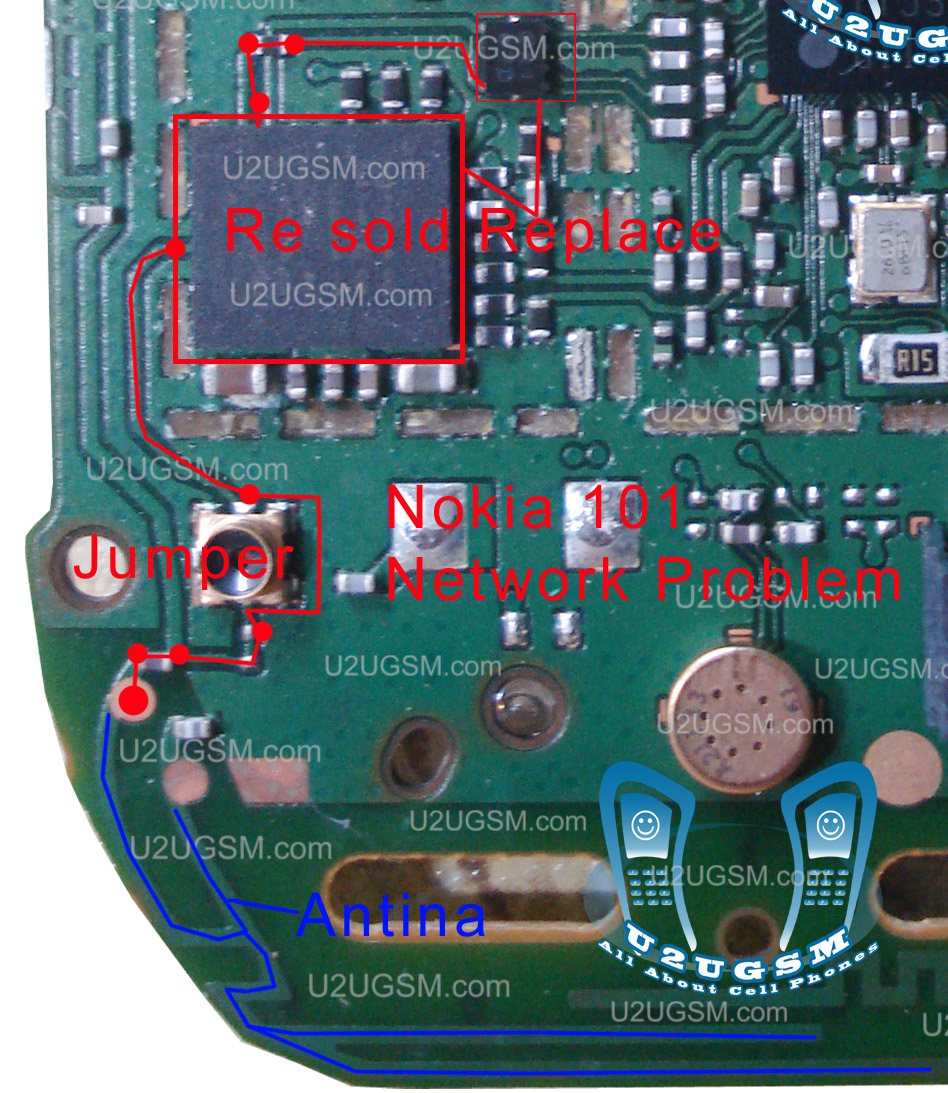
If in nokia 101 you have no network problem low signals problem then you can solve this problem with a few steps as shown in diagram bellow. look at the diagram and see all path and lines are defining ways of network signal function in nokia 101.

In diagram red lines show network path and blue line show antenna path. first of all check antenna is not broken and its points are in good condition and not water damaged or carbon is not on them. then make jumper on antenna as shown in diagram so that if it is discontinued then can be in normal flow.

Then heck red lines and red box parts and resold them with hot air so that if any of them is not showing continuity then can be in normal flow and pass the signals.

for more detail and new tips and tricks about cellphone service problem keep visiting this page we will update cellphone service diagrams timely with new cellphone diagrams.some related post are also given bellow you can read them also for more information about cellphone.

Nokia 101 MMC Memory Card Problem Solution

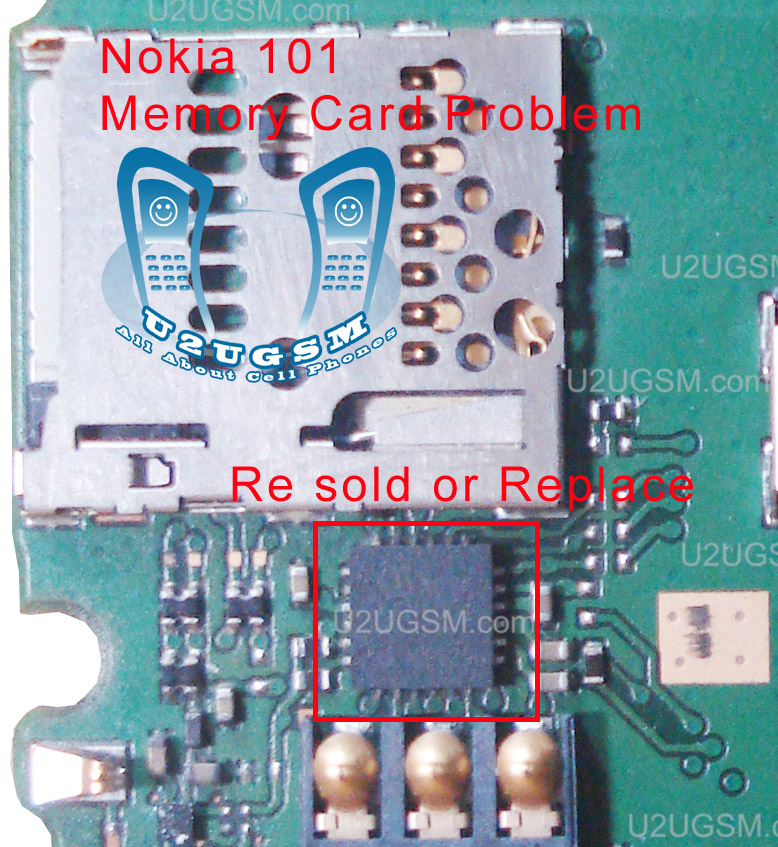
If you are facing mmc problem in nokia 101 then here is a helpful and useful diagram for you to solve these problems.loock at diagram bellow and in it you can see an ic is identified with red box. This part is used for memory card functions in nokia 101.

Check all the board carefully and if there is some rust carbon or water damage then clean it with electronics cleaner and dry it with hot air or put it under electrical bulb for a few mint so that can be dry. not apply to much heat because and can be harm for your mobile circuit.

Then resold this ic with hot air and if not solve the problem then change this.

for more detail and new tips and tricks about cellphone service problem keep visiting this page we will update cellphone service diagrams timely with new cellphone diagrams.some related post are also given bellow you can read them also for more information about cellphone.
Nokia 101 LCD Blank Display Ways Jumpers Problem Solution

Nokia 101 LCD problem,white display problem,blank display and no light in LCD display of nokia 101 can be solve with a few steps that are given in this post bellow is the diagram of nokia 101 to solve LCD problem in it.

In diagram above you can see there are different color lines and these are identifying the path of lcd prints. LCD pins are counted in picture from left to right as 1,2…12 and these prints can be check with a multi meter if any of them is broken or any component is broken you can make jumper to the points that are shown in picture and a big round point shows here you can make jumper and these are test points for LCD display blank display problems.

As in LCD points numbers are shown same numbers are defined with parts so that you can easily find where you have to apply jumpers. . if any part is not at the same place and have broken due to water damage or something else then you can see some points can also be scratched. So scratch them slightly and make jumper at that point.

for more detail and new tips and tricks about cellphone service problem keep visiting this page we will update cellphone service diagrams timely with new cellphone diagrams.some related post are also given bellow you can read them also for more information about cellphone.

Nokia 101 not charging problem solution ways

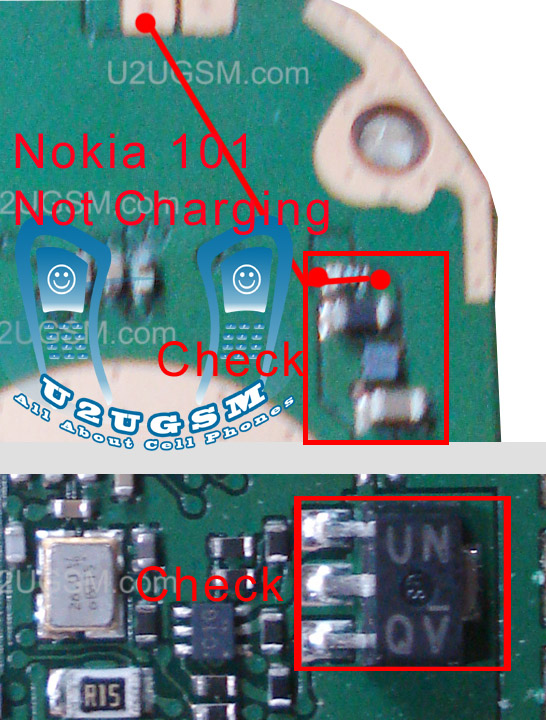
Nokia 101 not charging fake charging can be solve with a few steps that are describe in this post. so look at the diagram bellow and follow steps given in image.

As in all nokia sets charging points are two and one of them is ground and other is +v.in it a red line is identifying path of voltage that pass through these parts. so if link is broken then make jumper and check these parts and resold them or replace them.

Coil , resistance, and charging ic can be remove and you can apply direct jumper to the capacitor. Capacitor have on side ground while other side is +v.

for more detail and new tips and tricks about cellphone service problem keep visiting this page we will update cellphone service diagrams timely with new cellphone diagrams.some related post are also given bellow you can read them also for more information about cellphone.
Nokia 101 Mic Problem Jumpers Ways Solution

If nokia 101 mic is not working or sending low voice to the destination then you can solve mic problem with these few steps that are given bellow in diagram. look at the diagram and do following steps step by step.

In pictures you can see two main colors blue and red these colors are identifying outer and inner points of mic.outer is a ground point of mic while inner is a + point of mic. remove the old mic from board and then check the path as shown in diagram jumper new mic with these parts and if parts are also broken due to water damage then big round points are identifying locations where you can apply jumper and these are test points for mic problem in nokia 101, see some points can also be scratched. So scratch them slightly and make jumper at that point.

for more detail and new tips and tricks about cellphone service problem keep visiting this page we will update cellphone service diagrams timely with new cellphone diagrams.some related post are also given bellow you can read them also for more information about cellphone.

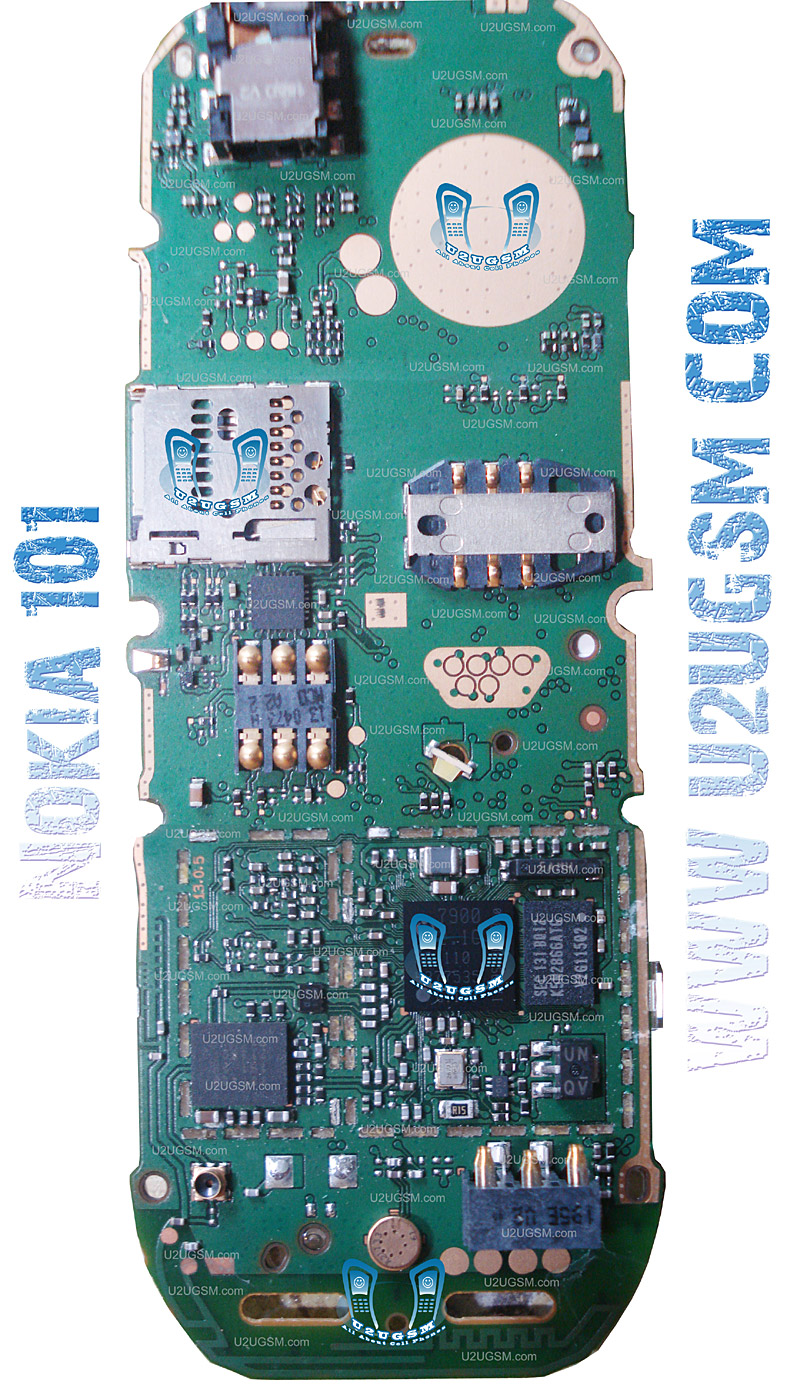
Nokia 101 Full PCB Diagram Mother Board Layout


 Nokia 101 Full PCB cellphone Diagram Mother Board Layout.
Here is the cellphone diagram of Nokia 101 PCB.so i will add some more cellphone diagram in high resolution so that you can add some more repairing trick for


High Resolution


Download High Resolution Diagram of Nokia 101


Nokia 101 if you find some new repairing techniques please must email me and i will post that diagram with your reference in this way we all make it possible "REPAIRING MADE EASY" the basic point of www.u2ugsm.com
Thanks
for more detail and new tips and tricks about cellphone service problem keep visiting this page we will update cellphone service diagrams timely with new cellphone diagrams.some related post are also given bellow you can read them also for more information about cellphone.

Nokia 101 Insert Sim Problem Solution Jumpers Ways

Nokia 101 have two stand by sims in it.if you are facing insert sim problem in nokia 101 for both sims or a single sim is not working here is the diagram that will help you to solve this problem in nokia 101.

In diagram you can see there are multiple lines with different colors that are indicating different sim points and there path to different parts you can check these path and if any of them is broken then you can make jumpers to them. if any part is not at the same place and have broken due to water damage or something else then you can see some points can also be scratched. So scratch them slightly and make jumper at that point.

Big round points on lines shows that you can make jumper on that point.

for more detail and new tips and tricks about cellphone service problem keep visiting this page we will update cellphone service diagrams timely with new cellphone diagrams.some related post are also given bellow you can read them also for more information about cellphone.