Showing posts with label Mic Ways. Show all posts

Nokia 111 mic solution

Nokia 111 mic solution is possible by following these few steps that are posted in this post and a diagram is also attached to fix Nokia 111 mic problem. So take a look at diagram bellow and find out these two tracks that are used in mic function of Nokia 111.
nokia 111 mic solution
In above diagram two different color lines are given to show the path of parts that are used for positive and negative tracks. Check all these parts with meter and if any or these links is missing apply jumper as shown. small circles are the test point to check it out.

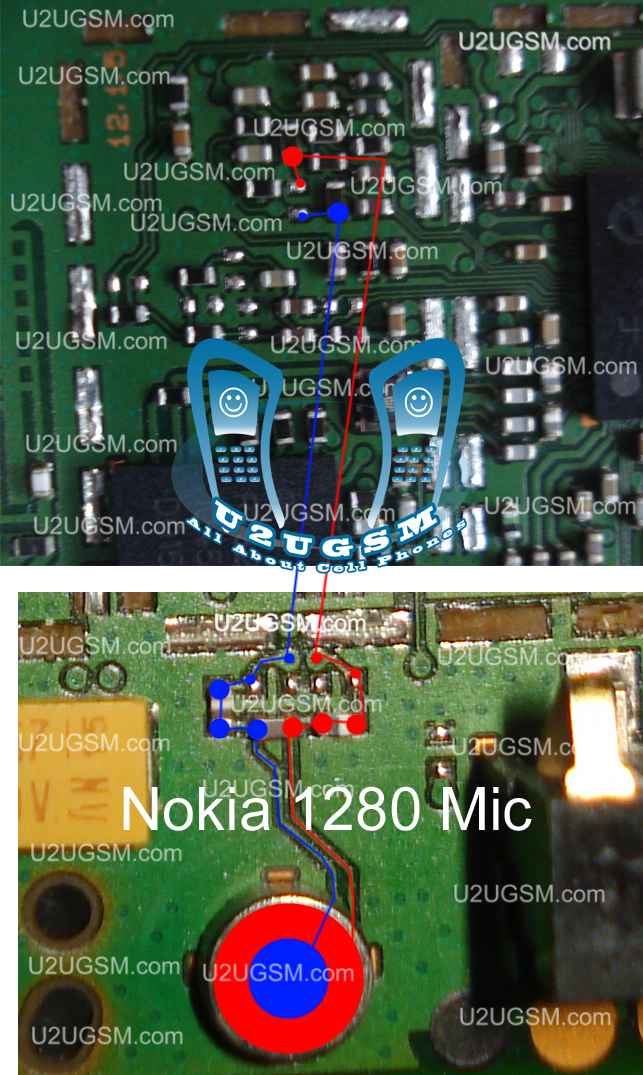
Nokia 1280 mic jumper

Nokia 1280 mic jumper Nokia 1280 mic solution Nokia 1280 tricks 1280 Nokia mic jumper M 1280 Nokia 1280 micro problem solutions Nokia 1280 mouth piece jumper Nokia 1280 mouthpiece problem Nokia 1280 mouth piece solution jumper jalur mic Nokia 1280 solution for mouth piece of Nokia 1280
nokia 1280 mic jumper
make these jumpers if any of them is broken and also check mic volt some time all links are OK but mic volt are not same as the should be in that case change Nokia 1280 mic. 

Nokia 1280 mic ways

Nokia 1280 mic ways Nokia 1280 mic jumper Nokia 1280 signal solution Nokia 1280 network solution Nokia 1280 network problem Nokia 1280 keypad Nokia x2 mouth piece jumper Nokia 1280 mouthpiece solution Nokia 1280 mouthpiece jumper Nokia 1280 mic problem solution Nokia 1280 network problem solution
nokia 1280 mic ways
if mic microphone is not working in Nokia 103 you can solve this problem with these cellphone jumpers that are defined in this diagram attached with this post.just look at the diagram and check these links that are defined in it. 

Nokia Nokia X2-02 Mic problem solution Microphone not working

If mic is not working in Nokia X2-02. Microphone solution with jumpers, Low voice of Nokia X2-02 mic problem solution, Nokia X2-02 mic jumpers to make it solve.
Nokia Nokia X2-02 Mic problem solution Microphone not working
If mic is not working or have a low voice it can be fault of mic and housing. Check Nokia X2-02 housing ( body ). All housing have a small whole at the point of mic. In some cases rust or dust cover this point and the voice can not reach proper to the mic point so make it clean if there is some dust on it.

After disassemble of Nokia X2-02 look at the motherboard for rust carbon or burned parts. If you found some rust or carbon apply electronics cleaner on the mother board and apply hot air to make it dry proper.

Applying too much heat can damage the mother board and parts.It also can be harm for your skin.So keep in mind about normal heat flow when making it dry.

Remove mic and check all these tracks that are provided in above diagram to solve mic problem in Nokia X2-02. In diagram two different color lines are given to identify all parts that are used to solve Nokia X2-02 mic problem with jumpers.

Nokia Nokia X2-05 Mic problem solution Microphone not working

If mic is not working in Nokia X2-05. Microphone solution with jumpers, Low voice of Nokia X2-05 mic problem solution, Nokia X2-05 mic jumpers to make it solve.
Nokia Nokia X2-05 Mic problem solution Microphone not working
If mic is not working or have a low voice it can be fault of mic and housing. Check Nokia X2-05 housing ( body ). All housing have a small whole at the point of mic. In some cases rust or dust cover this point and the voice can not reach proper to the mic point so make it clean if there is some dust on it.

After dis assembly of Nokia X2-05 look at the motherboard for rust carbon or burn parts. If you found some rust or carbon apply electronics cleaner on the mother board and apply hot air to make it dry proper.

Applying too much heat can damage the mother board and parts.It also can be harm for your skin.So keep in mind about normal heat flow when making it dry.

Remove mic and check all these tracks that are provided in above diagram to solve mic problem in Nokia X2-05. In diagram two different color lines are given to identify all parts that are used to solve Nokia X2-05 mic problem with jumpers.

If some parts are missing or damage apply jumper on these points where small circles are pointing in Nokia mic repairing diagram above. 

Nokia Asha 203 Mic problem solution jumper ways

Nokia asha 203 mic problem, Low voice in Nokia asha 203, Mic is not working in Nokia asha 203.All these mic faults can be solve with a few simple steps that I am posting in this post.A mic repairing diagram for Nokia asha 203 is also attached with this post.
Nokia Asha 203 Mic problem solution jumper ways
If you find some carbon or water damages in the mother board. Clean these parts with electronics cleaner and apply heat with hot air to make it dry. Much heat can damage the Nokia asha 203 mother board.
In diagram above you can see two different color lines these lines are given to identify components that are used in mic function of Nokia asha 203.Check all these tracks with meter and if any link is break apply jumpers as given in Nokia asha 203 mic repairing diagram above.
for more detail and new tips and tricks about cellphone service problem keep visiting this page we will update cellphone service diagrams timely with new cellphone diagrams.some related post are also given bellow you can read them also for more information about cellphone.

Nokia C5-06 Mic problem solution jumper ways

If mic is not working in Nokia C5-06.You are facing Low mic voice or no mic voice problem.All these problems can be fix with a few tips and tricks that are given in this post.
Nokia C5-06 Mic problem solution jumper ways
If you found some rust carbon or water damages then it can also be cause of Nokia C5-06 mic problem to solve and fix mic problem in Nokia C5-06 clean all the rust and carbon with electronics cleaner and apply hot air to make it dry.

In above diagram you can see a mic ( microphone ) and some red color lines. These lines are pointing the parts that are used in microphone mic functions in Nokia C5-06.

Check all these tracks and paths with meter and if any of them is missing apply jumpers as shown in above diagram.

for more detail and new tips and tricks about cellphone service problem keep visiting this page we will update cellphone service diagrams timely with new cellphone diagrams.some related post are also given bellow you can read them also for more information about cellphone.

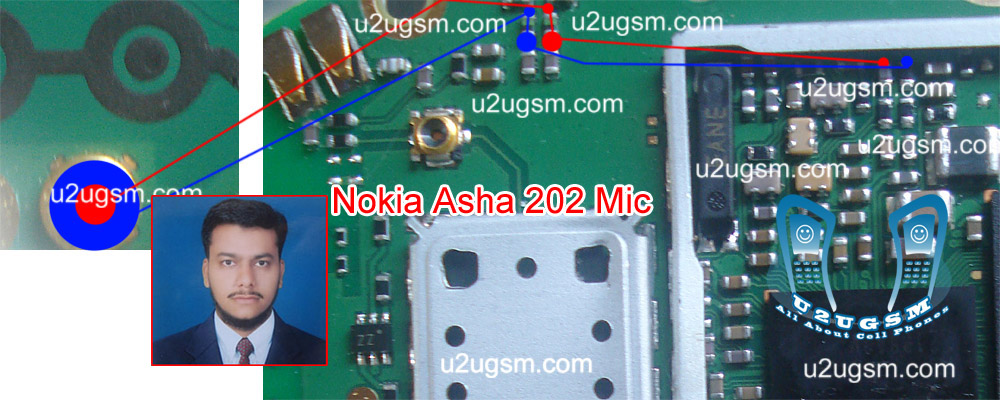
Nokia Asha 202 Mic problem solution jumper ways

Nokia asha 202 mic problem, Low voice in Nokia asha 202, Mic is not working in Nokia asha 202.All these mic faults can be solve with a few simple steps that I am posting in this post.A mic repairing diagram for Nokia asha 202 is also attached with this post.
Nokia Asha 202 Mic problem solution jumper ways
If you find some carbon or water damages in the mother board. Clean these parts with electronics cleaner and apply heat with hot air to make it dry. Much heat can damage the Nokia asha 202 mother board.
In diagram above you can see two different color lines these lines are given to identify components that are used in mic function of Nokia asha 202.Check all these tracks with meter and if any link is break apply jumpers as given in Nokia asha 202 mic repairing diagram above.
for more detail and new tips and tricks about cellphone service problem keep visiting this page we will update cellphone service diagrams timely with new cellphone diagrams.some related post are also given bellow you can read them also for more information about cellphone.

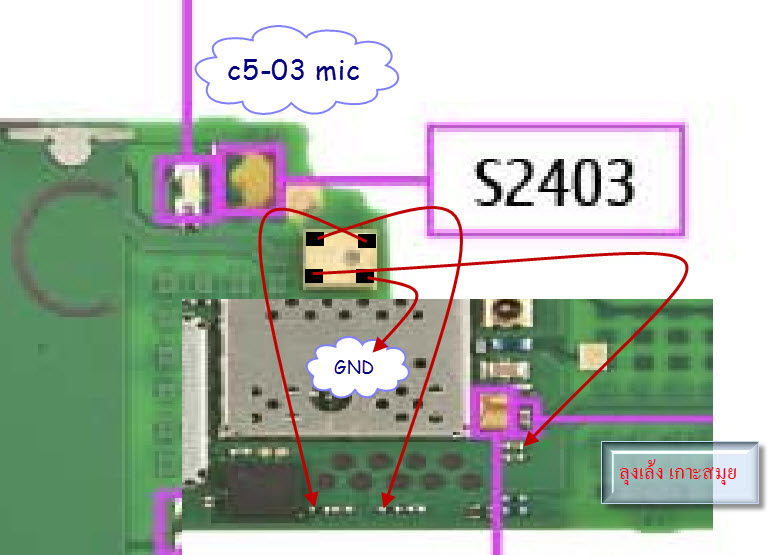
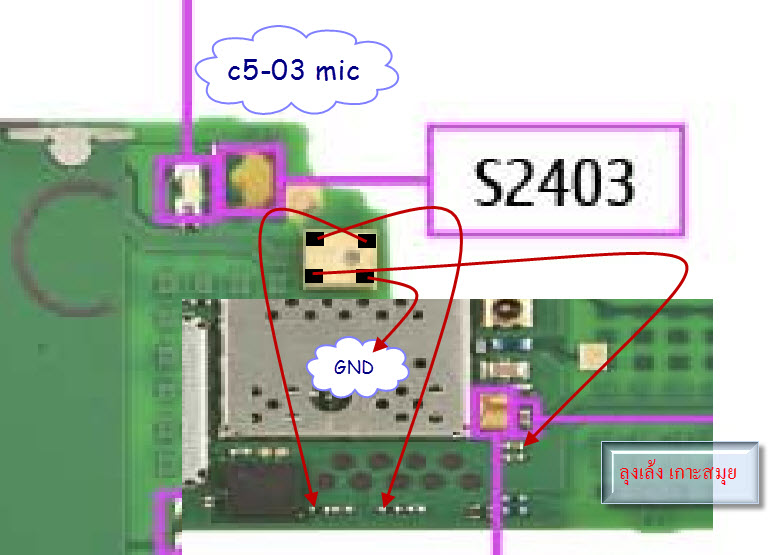
Nokia C5-03 Mic problem solution jumper ways

If mic is not working in Nokia C5-03.You are facing Low mic voice or no mic voice problem.All these problems can be fix with a few tips and tricks that are given in this post.
Nokia C5-03 Mic problem solution jumper ways
If you found some rust carbon or water damages then it can also be cause of Nokia C5-03 mic problem to solve and fix mic problem in Nokia C5-03 clean all the rust and carbon with electronics cleaner and apply hot air to make it dry.

In above diagram you can see a mic ( microphone ) and some red color lines. These lines are pointing the parts that are used in microphone mic functions in Nokia C5-03.

Check all these tracks and paths with meter and if any of them is missing apply jumpers as shown in above diagram.

for more detail and new tips and tricks about cellphone service problem keep visiting this page we will update cellphone service diagrams timely with new cellphone diagrams.some related post are also given bellow you can read them also for more information about cellphone.

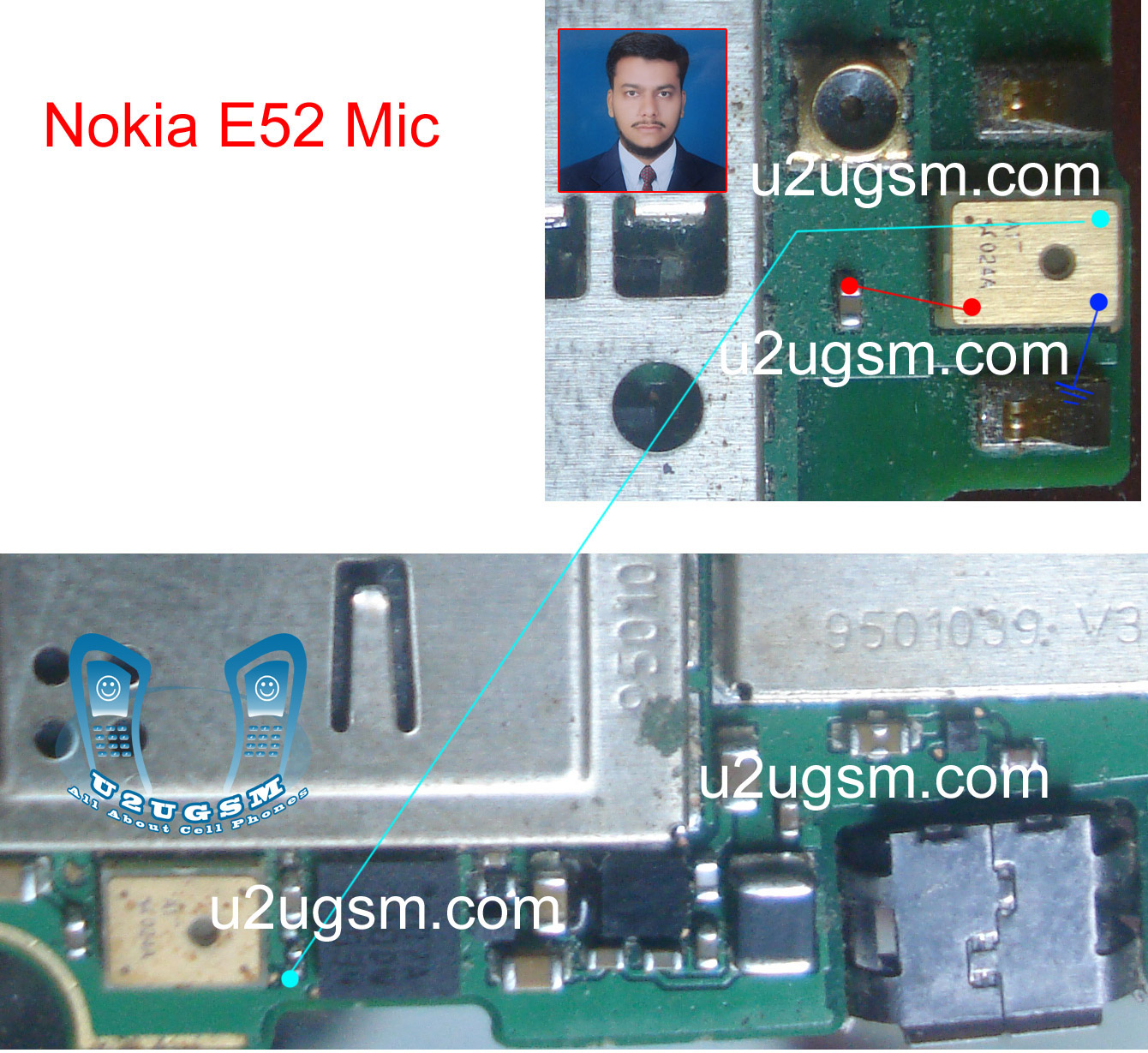
Nokia E52 mic solution problem jumper ways

Mic problem in Nokia E52 can be solve with a few simple steps that I am posting in this problem solution. A diagram is also attached with this post that shows parts that are used for mic function in Nokia E52. Mic problem can be cause of mic damages or due to water damages.
Nokia E52 mic solution problem jumper ways
After dis assembly check mother board and if you find some rust carbon in it clean the mother board with CTC and apply some heat to dry the mother board.Do not apply too much heat it can damage the mother board.
Check all these parts that are given in different colors to solve Nokia E52 mic problem in it. If any of these ways is missing apply jumpers as given in Nokia E52 mic solution repairing diagram above.

for more detail and new tips and tricks about cellphone service problem keep visiting this page we will update cellphone service diagrams timely with new cellphone diagrams.some related post are also given bellow you can read them also for more information about cellphone.

Nokia C5 mic solution problem jumper ways

Mic problem in Nokia C5 can be solve with a few simple steps that I am posting in this problem solution. A diagram is also attached with this post that shows parts that are used for mic function in Nokia C5. Mic problem can be cause of mic damages or due to water damages.
Nokia C5 mic solution problem jumper ways
After disassemble check mother board and if you find some rust carbon in it clean the mother board with CTC and apply some heat to dry the mother board.Do not apply too much heat it can damage the mother board.
Check all these parts that are given in different colors to solve Nokia C5 mic problem in it. If any of these ways is missing apply jumpers as given in Nokia C5 mic solution repairing diagram above.

for more detail and new tips and tricks about cellphone service problem keep visiting this page we will update cellphone service diagrams timely with new cellphone diagrams.some related post are also given bellow you can read them also for more information about cellphone.

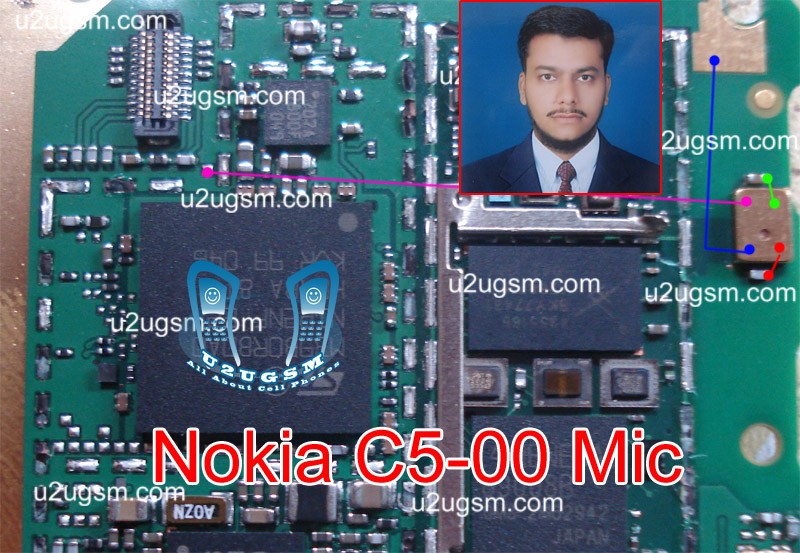
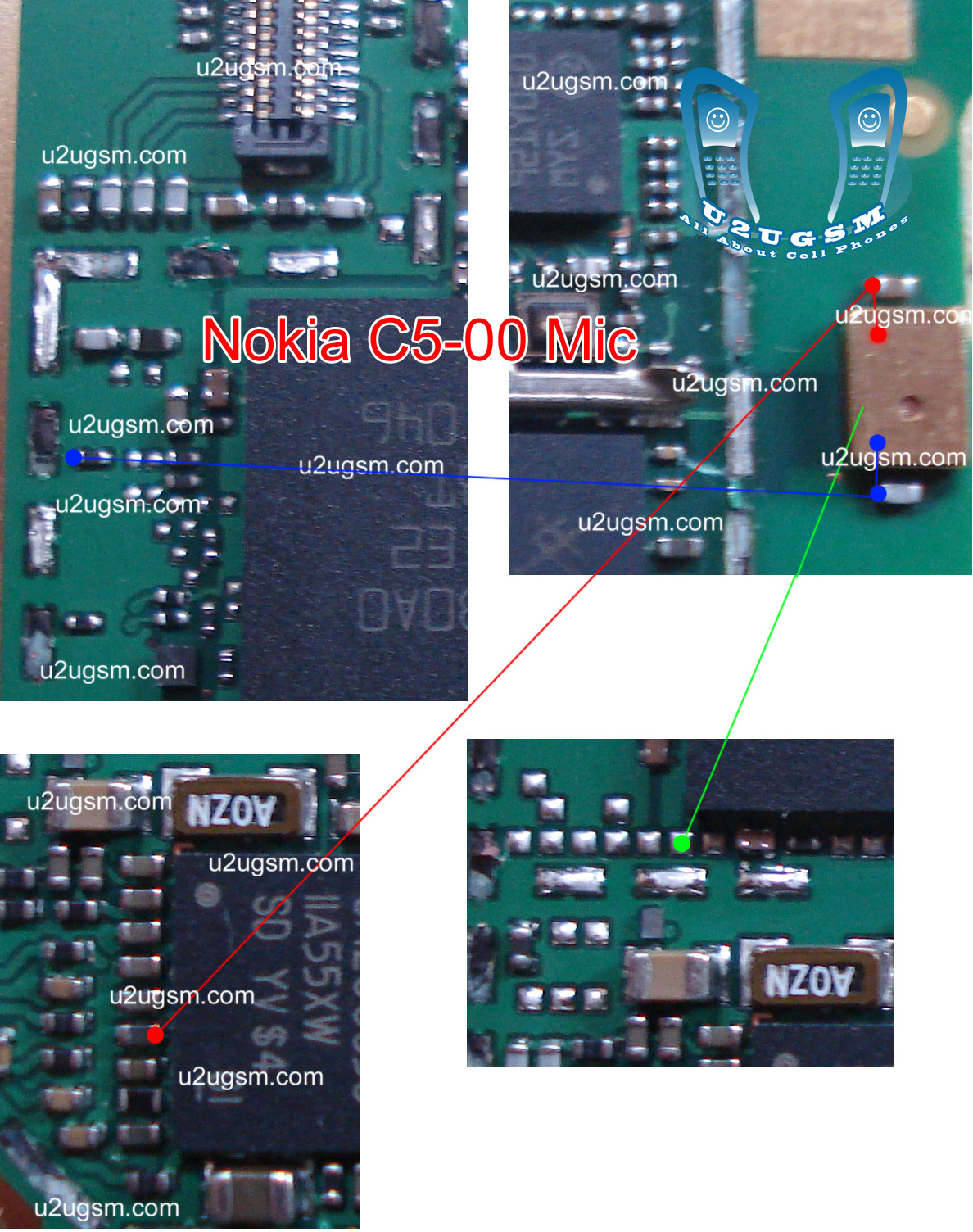
Nokia C5-00 Mic problem solution jumper ways

Nokia C5-00 Mic problem, Mic not working, Microphone problem solution, Low mic voice to the destination mobile phone. All these problem can be the cause of water damages or rust and carbon.The mobile phone's mic may can be damage also.
Nokia C5-00 Mic problem solution jumper ways
To solve mic problem in Nokia C5-00 you have to remove the mic and then check all these tracks and ways that are given in above repairing diagram for Nokia C5-00 Mic.If you find any print is missing apply jumpers as given in diagram above.

for more detail and new tips and tricks about cellphone service problem keep visiting this page we will update cellphone service diagrams timely with new cellphone diagrams.some related post are also given bellow you can read them also for more information about cellphone.

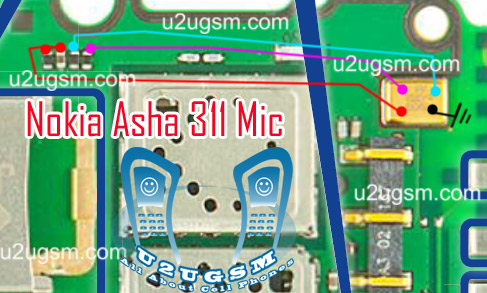
Nokia Asha 311 Mic Problem Jumpers Ways Solution

if Nokia Asha 311 have mic problem our voice can not reach to destination and we can not record voice in it.mic problem can be reason of parts damages or carbon rust and water damages.so to solve this issue in Nokia Asha 311 look at diagram bellow and check all these components and parts.these parts are used in Microphone function in Nokia Asha 311.
Nokia Asha 311 Mic Problem Jumpers Ways Solution

once you have dis assembled mobile phone look at board vary carefully and check if there is some rust or carbon.Clean
these parts and area with electronics cleaner and leave it to dry for a few mints with hot air.In above diagram all tracks are given in red and blue colors.these tracks show positive and negative paths of mic parts.so check these components and paths with electronics miter and if path missing apply jumpers.
Because mic is attached with board so you can remove it with soldering iron by applying much solder on mic and then slip it once it is too hot.And use new mic to fix mic problem in Nokia Asha 311.

for more detail and new tips and tricks about cellphone service problem keep visiting this page we will update cellphone service diagrams timely with new cellphone diagrams.some related post are also given bellow you can read them also for more information about cellphone.

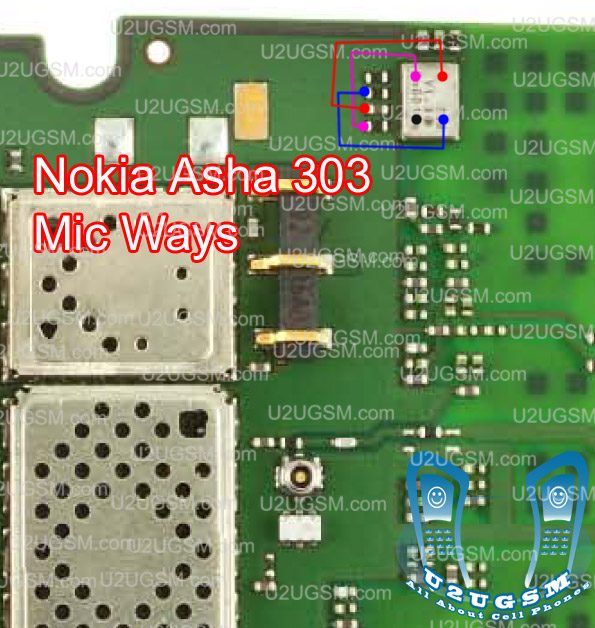
Nokia Asha 303 Mic Not Working Problem Solution Jumpers

If you are facing mic problem low voice or not voice out going to destination then this diagram will help you to solve mice problem in Nokia asha 303. In diagram below you can see a mic that is defined with red boarder and some parts are also defined with red line boarder.

So we have to check all these parts that are in red board to solve mic problem and mic not working problem in Nokia asha 300.check mother board vary carefully if there is any rust carbon or water damage issue. Clean mother board form these areas and apply some heat with hot air so that mother board of Nokia asha 303 can be dry.

If with only service it can not be solved change mic and you can remove mic with hot air or soldering iron. In Nokia asha 300 mic has 4 points itself and one is ground other are data clock points. so we can apply jumpers in these point.

for more detail and new tips and tricks about cellphone service problem keep visiting this page we will update cellphone service diagrams timely with new cellphone diagrams.some related post are also given bellow you can read them also for more information about cellphone.

Nokia Asha 300 Mic Not Working Problem Solution Jumpers

If you are facing mic problem low voice or not voice out going to destination then this diagram will help you to solve mice problem in Nokia asha 300. In diagram below you can see a mic that is defined with red boarder and some parts are also defined with red line boarder.

So we have to check all these parts that are in red board to solve mic problem and mic not working problem in Nokia asha 300.check mother board vary carefully if there is any rust carbon or water damage issue. Clean mother board form these areas and apply some heat with hot air so that mother board of Nokia asha 300 can be dry.

If with only service it can not be solved change mic and you can remove mic with hot air or soldering iron. In Nokia asha 300 mic has 4 points itself and one is ground other are data clock points. so we can apply jumpers in these point.

for more detail and new tips and tricks about cellphone service problem keep visiting this page we will update cellphone service diagrams timely with new cellphone diagrams.some related post are also given bellow you can read them also for more information about cellphone.

Nokia C2-01 Mic problem solution jumper ways

If Mic is not working in Nokia C2-01 we can not make a voice call and we can not record sound in it. To solve microphone problem you can read all this post and follow these steps that are given in diagram bellow.
Nokia C2-01 Mic problem solution jumper ways
So look at above diagram and after dis assembly of Nokia C2-01 replace old mic with new one.If replacement of mic did not solve the problem in Nokia C2-01.Try to check these parts that are inline with red and blue colors.

If any path out of these is missing you can apply jumpers as shown in repairing diagram.

In mic repairing diagram some small circles indicate that you can apply jumpers on these points if parts are missing or damage. And in broken links you can also apply jumpers on same places as given in it.

for more detail and new tips and tricks about cellphone service problem keep visiting this page we will update cellphone service diagrams timely with new cellphone diagrams.some related post are also given bellow you can read them also for more information about cellphone.

Nokia 2320 Classic Mic Problem Solution Jumper Ways

If you have a mic problem in Nokia 2320 Classic then you can not make a voice call and also you will not be able to make call recording in it.to solve this mic problem in Nokia 2320 Classic you can follow a few steps and can look at diagram bellow.
Nokia 2320 Classic Mic Problem Solution Jumper Ways
In above diagram you can see mic and its ways all mic tracks are given in different colors and you can apply jumpers as shown in it.

You can replace mic also with this diagram and following to its tracks you can fix microphone problem in Nokia 2320 Classic.

for more detail and new tips and tricks about cellphone service problem keep visiting this page we will update cellphone service diagrams timely with new cellphone diagrams.some related post are also given bellow you can read them also for more information about cellphone.

Nokia 2330 Classic Mic Problem Solution Jumper Ways

If you have a mic problem in Nokia 2330 Classic then you can not make a voice call and also you will not be able to make call recording in it.to solve this mic problem in Nokia 2330 Classic you can follow a few steps and can look at diagram bellow.
Nokia 2330 Classic Mic Problem Solution Jumper Ways
In above diagram you can see mic and its ways all mic tracks are given in different colors and you can apply jumpers as shown in it.

You can replace mic also with this diagram and following to its tracks you can fix microphone problem in Nokia 2330 Classic.

for more detail and new tips and tricks about cellphone service problem keep visiting this page we will update cellphone service diagrams timely with new cellphone diagrams.some related post are also given bellow you can read them also for more information about cellphone.

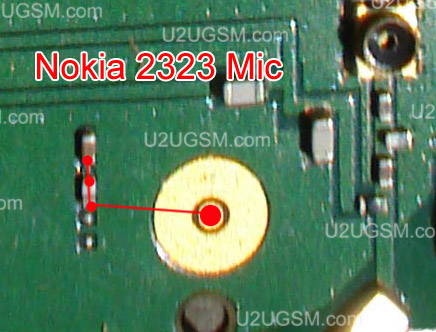
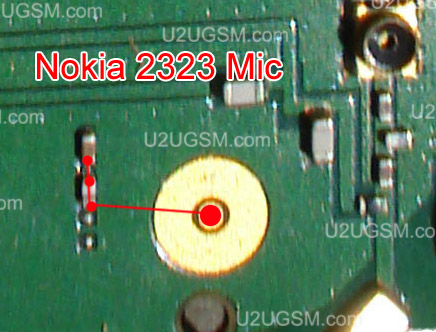
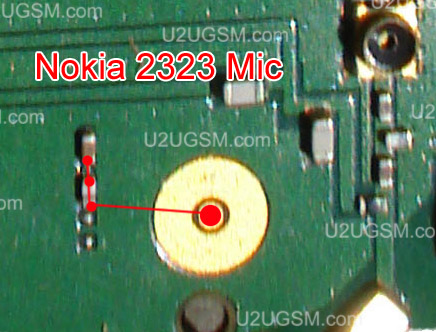
Nokia 2323 Classic Mic Problem Solution Jumper Ways

If you have a mic problem in Nokia 2323 Classic then you can not make a voice call and also you will not be able to make call recording in it.to solve this mic problem in Nokia 2323 Classic you can follow a few steps and can look at diagram bellow.
Nokia 2323 Classic Mic Problem Solution Jumper Ways
In above diagram you can see mic and its ways all mic tracks are given in different colors and you can apply jumpers as shown in it.

You can replace mic also with this diagram and following to its tracks you can fix microphone problem in Nokia 2323 Classic.

for more detail and new tips and tricks about cellphone service problem keep visiting this page we will update cellphone service diagrams timely with new cellphone diagrams.some related post are also given bellow you can read them also for more information about cellphone.

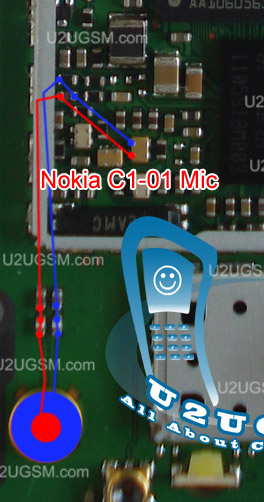
Nokia C1-01 Mic problem solution jumper ways

If Mic is not working in Nokia C1-01 we can not make a voice call and we can not record sound in it. To solve microphone problem you can read all this post and follow these steps that are given in diagram bellow.
Nokia C1-01 Mic problem solution jumper ways
So look at above diagram and after dis assembly of Nokia C1-01 remove old mic with soldering iron and be careful so that you do not make its prints damage.

After removing the old mic check all these tracks that are given in red and blue lines. If any path out of these is missing you can apply jumpers as shown in repairing diagram.

In mic repairing diagram some small circles indicate that you can apply jumpers on these points if parts are missing or damage. And in broken links you can also apply jumpers on same places as given in it.

for more detail and new tips and tricks about cellphone service problem keep visiting this page we will update cellphone service diagrams timely with new cellphone diagrams.some related post are also given bellow you can read them also for more information about cellphone.