Nokia 101 ringer jumper

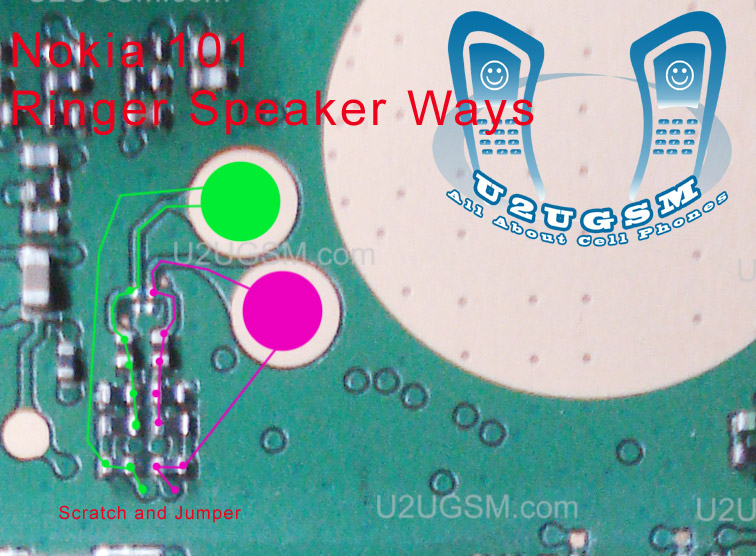
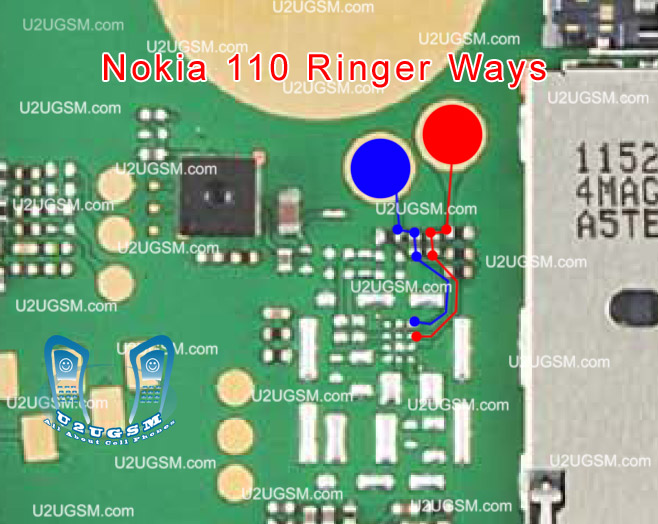
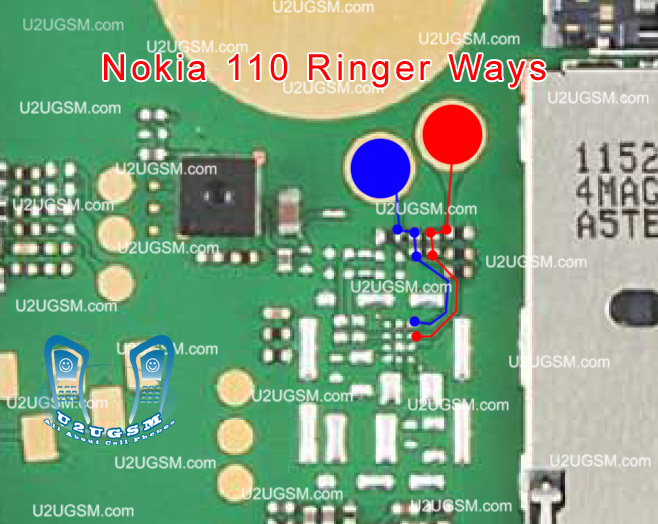
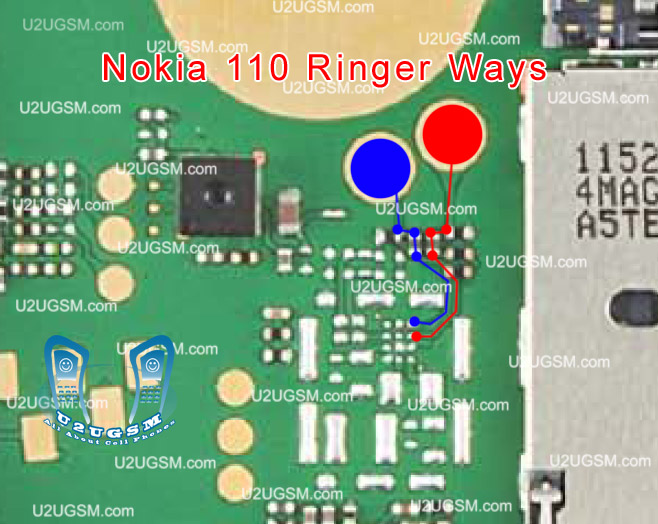
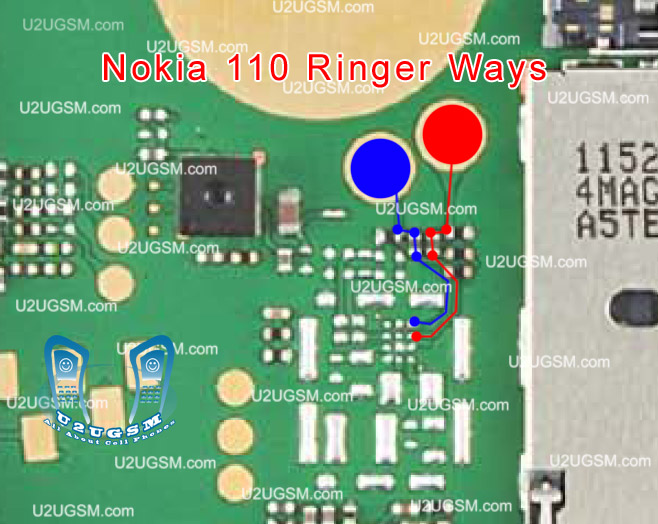
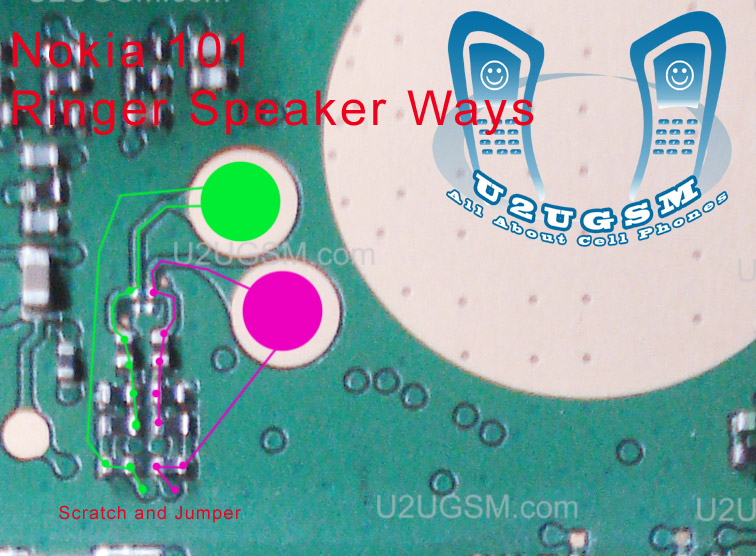
Nokia 101 ringer jumpers are given in this post to solve ringer problem in Nokia 101.as in diagram bellow you can see blue and red lines. these lines are given to identify the tracks that are used in ringer function of Nokia 101.
nokia 101 ringer jumper
Check all these parts that are shown in above diagram and if you find missing track or damage parts replace them and apply jumpers as given in Nokia 101 ringer jumper diagram.
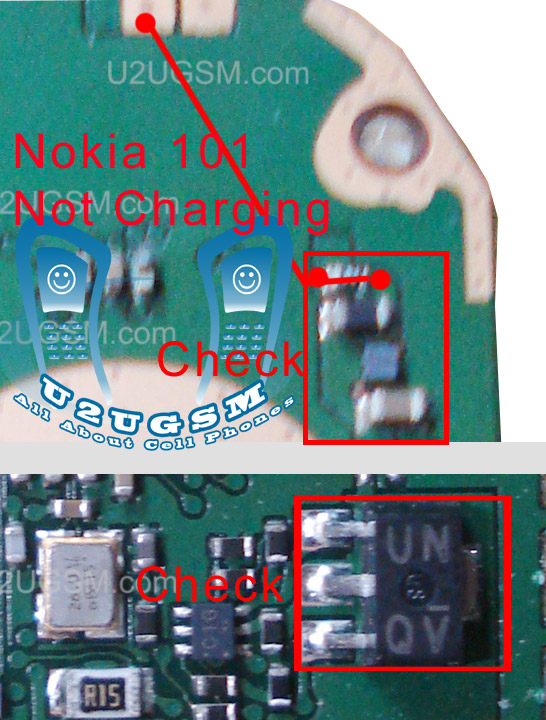
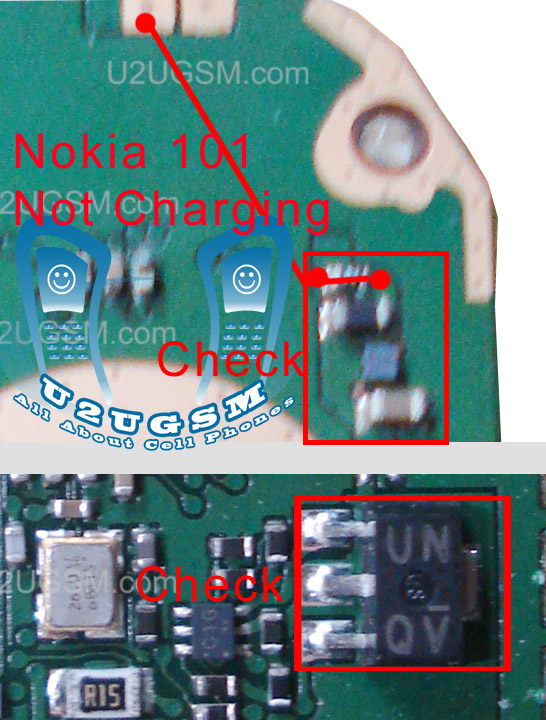
Nokia 100 charging solution

nokia 100 charging solution.nokia 100 charging problem solution
nokia 100 charging
nokia 100 charging jumper solution
nokia x2-00 not charging solution
nokia 100 not charging jumper
samsung GT-E 2130
nokia 100 charging way
nokia 100 charger not supported
nokia 100 charging ic
nokia 100 charging track
nokia 100 charging solution
nokia 100 charging fault
images repair Nokia Not Charging 100
Nokia 100 charging problam
NOKIA 100CHARGING PROBLEM SOLUTION
nokia100 charging prob
repair nokia 100 charger
n 100 charging problem solution
nokia 100 blue print
www nokia 100 charging problem
nokia 101 not charging problem solution video

Nokia Asha 202 Full PCB Diagram Mother Board Layout

Nokia Asha 202 Full PCB cellphone Diagram Mother Board Layout.
Here is the cellphone diagram of Nokia Asha 202 PCB.so i will add some more cellphone diagram in high resolution so that you can add some more repairing trick for
Nokia Asha 202 Full PCB Diagram Mother Board Layout

High Resolution

Download High Resolution Diagram of Nokia Asha 202


Nokia Asha 202 if you find some new repairing techniques please must email me and i will post that diagram with your reference in this way we all make it possible “REPAIRING MADE EASY” .
Thanks
for more detail and new tips and tricks about cellphone service problem keep visiting this page we will update cellphone service diagrams timely with new cellphone diagrams.some related post are also given bellow you can read them also for more information about cellphone.

Nokia 100 ear speaker problem

Nokia 100 ear speaker problem jumpers are given in diagram that is attached with this post. You can see jumper ways and tracks in it.Check all these path and if any of them is missing then apply jumpers as given in it.
nokia 100 ear speaker problem
In above two lines are given one is blue and the other is red. Both lines are used in ear peace speaker function of Nokia 100. and these paths that are identified in the diagram.

Nokia 100 charging ways

Nokia 100 charging ways are given in this diagram that is posted in this post. So find out these tracks and apply jumpers if any of them is missing.
nokia 100 charging ways
In repairing diagram above you can see blue and red lines. These lines are the path of parts used in charging function.If you find damage or burn parts then replace them to solve Nokia 100 charging problem.

Nokia 111 Keypad 1,4,7,* is not working solution

If Nokia 111 keypad is not working you can solve keypad problem in Nokia 111 by following these steps that are given in in this post. Look at the diagram bellow and follow these steps.
Nokia-111-Keypad-147-is-not-working-solution
Keep in mind after dis assembly of Nokia 111 look at the whole mother board for carbon water damages and rust. Make it clean with electronics cleaner and apply heat so that it can be dry smoothly. Do not apply much heat because much heat can harm your skin and may can damage the mother board.
In above diagram you can see a resistance is identified. Remove it and it will solve keypad problem if keys are working duplicate. Nokia 111 keypad problem solution.

Nokia 111 Light Problem Solution Jumper Ways

In Nokia 111 Led Light Problem can be due to water damages. Broken parts and missing components can create a problem of led lights, LCD display light problem. To solve Nokia 111 light problem you can follow a few basic steps that i am going to post here today.
Nokia 111 Light Problem Solution Jumper Ways
Keep in mind after dis assembly of Nokia 111 look at the whole mother board for carbon water damages and rust. Make it clean with electronics cleaner and apply heat so that it can be dry smoothly. Do not apply much heat because much heat can harm your skin and may can damage the mother board.
Remove three legs Divert and apply jumpers as shown in the above diagram. Check LCD prints because they can also be cause of Nokia 111 light problem.

Nokia 111 network solution

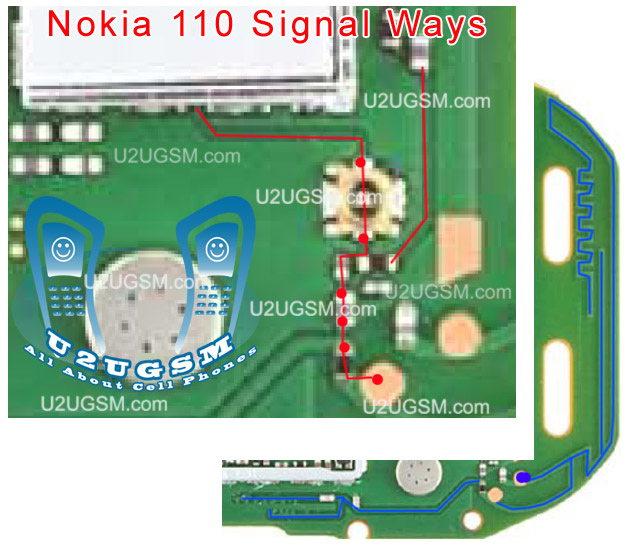
If you want Nokia 111 network solution. This post will help you a lot.In this post a diagram is attached that will show you how to repair network problem in Nokia 111.
nokia 111 network solution
In this post you can see all Nokia Asha 302 Antenna Connectors tracks. 1st antenna connector X4000 marked with Red jumper passes through Z4003, C4006 then connects to X4003 and passes through R4004 finally connects to C4005 & C4004. The 2nd X4002 and 4th X4004 are both ground. The 3rd antenna connector X4001 passes through Z4006 and connects to X4006.

Nokia 111 insert sim solution

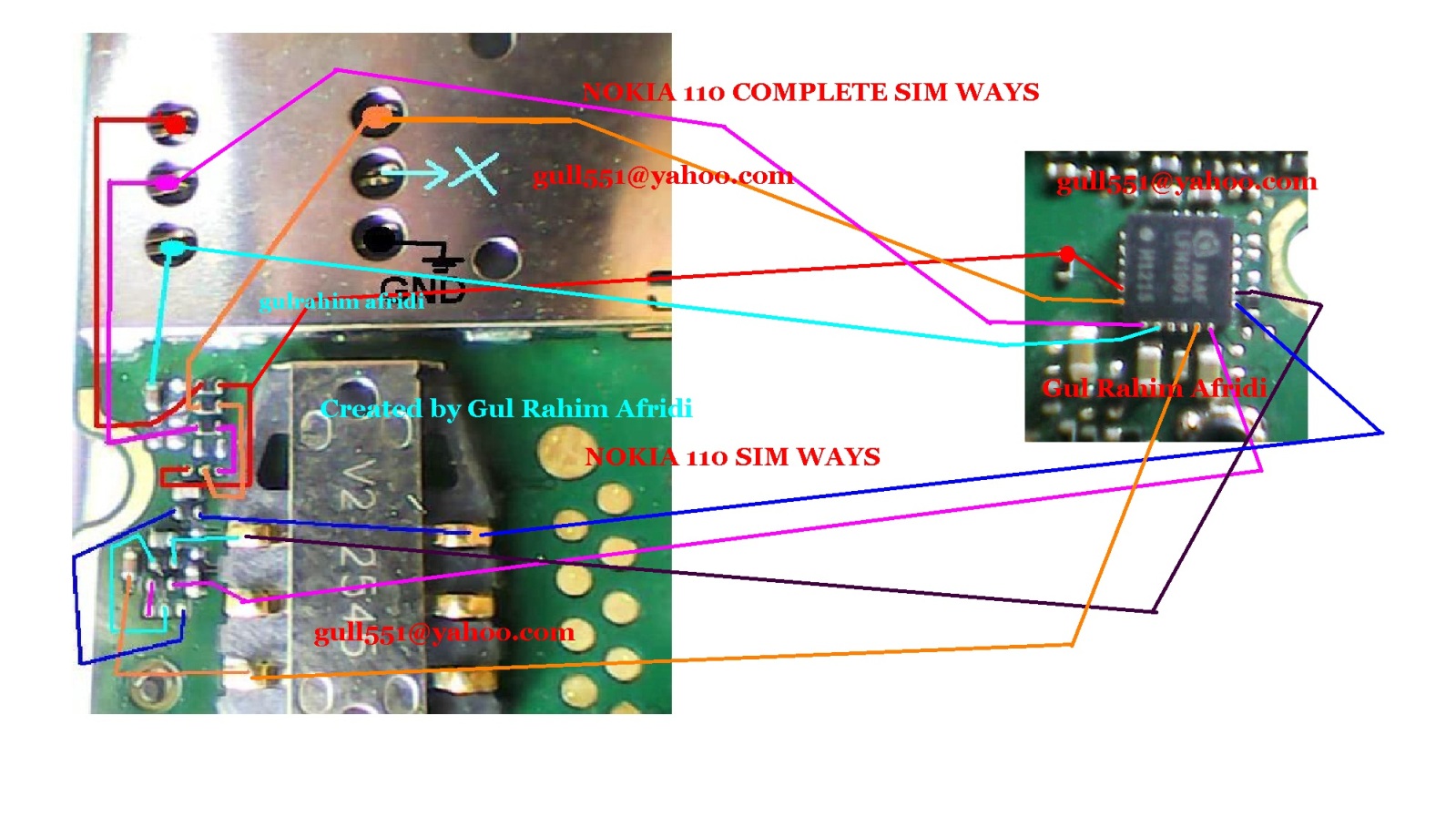
Nokia 111 have two sim jacks and if you have problem of Nokia 111 insert sim 1 or insert sim 2. You can find out the solution in bellow diagram. It may can be cause of water damages or burning parts.
nokia 111 insert sim solution
In above diagram you can find some different color lines. All these lines are given to show tracks and paths to make jumpers if any of them is missing.You can check these tracks with meter and if any of them is missing apply jumpers as shown in above insert sim repairing diagram.

Nokia 111 insert sim problem solution tested working

If Nokia 111 have insert sim problem, invalid sim problem, sim not working in Nokia 111. All these sim problems of Nokia 111 can be solve with these few steps that are given in this post.
Nokia 111 insert sim problem solution tested working
Keep in mind after dis assembly of Nokia 111 look at the whole mother board for carbon water damages and rust. Make it clean with electronics cleaner and apply heat so that it can be dry smoothly. Do not apply much heat because much heat can harm your skin and may can damage the mother board.
Look at the diagram above that is given to repair Nokia 111 insert sim problem in this post.In this diagram you can see some different color lines these lines are identifying different paths and tracks that are used in insert sim function.

Nokia 111 keypad ic jumper 147 keys

If 1,4,7 keys are not working in Nokia 111 then you can fix this keypad problem with diagram bellow. In this diagram you can see a capes-tor. This part can become short due to water damages and may cause for Nokia 111 keypad problem.
nokia 111 keypad ic jumper 147 keys
In first step try to make it clean with electronics cleaner and apply hot air so that it can be dry. Do not apply much heat because it can harm your skin and may can damage the mother board.

Nokia 111 light jumper solution

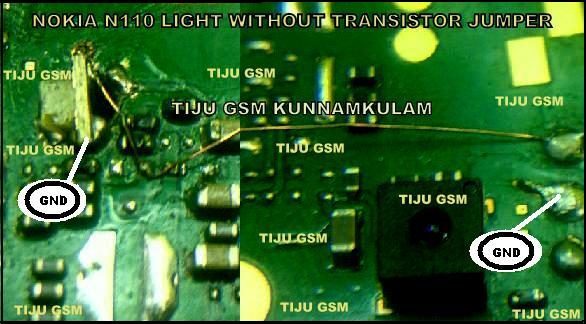
Nokia 111 light problem can be cause of water damages or due to missing parts. Some time components may can be burn. After disassemble of Nokia 111 check all these parts that are given in bellow diagram.
nokia 111 light jumper solution
In above diagram we can see some different color lines these lines are given to show LCD prints and there tracks. each LCD point has its different path. We have to check all these path and apply jumper if any of these is missing or broken. Once we find out missing path and apply jumpers we will be able to fix the light problem in Nokia 111.

Nokia 111 lcd light jumper solution

If Nokia 111 LCD light is not lighting (not working) you can solve this problem by following a few steps that are given bellow in diagram.In bellow diagram you can see some different color lines. All these lines are given to show different LCD track that are used in display function of Nokia 111.
nokia 111 lcd light jumper solution
Print number 10 and 11 is used for light in Nokia 111. so if your LCD display is proper but only light is not working you should have focus on these two lines and check there path and parts.If you find any missing part or damage part then apply jumper there.

Nokia 111 test mode solution

If you have Nokia 111 test mode and local mode problem it can be sole with service of Nokia 111 mother board. Check the mother board for water damages and rust. Apply electronics clean and clean it carefully then apply heat so that it can be dry.Keep in mind hot air should not be to much hot because it can harm your skin and can damage the mother board and its parts.
nokia 111 test mode solution
Once you check all these path and tracks with electronics meter apply jumpers if any of these parts is missing. or replace parts those are damage.

Nokia 111 mic solution

Nokia 111 mic solution is possible by following these few steps that are posted in this post and a diagram is also attached to fix Nokia 111 mic problem. So take a look at diagram bellow and find out these two tracks that are used in mic function of Nokia 111.
nokia 111 mic solution
In above diagram two different color lines are given to show the path of parts that are used for positive and negative tracks. Check all these parts with meter and if any or these links is missing apply jumper as shown. small circles are the test point to check it out.

Nokia 111 ringer solution

This post is about Nokia 111 ringer solution solving. If your Nokia 111 ringer buzzer not working as you see in the diagram below. This solution works on all Nokia 111 RM-827, Nokia 1110 RM-810, Nokia 111 and Nokia 1111 RM-811 RM-871st
nokia 111 ringer solution
First make sure that Nokia 111′s ringer is not broke, you can test it with electronic meter or just replace it with a new one. If your ringtone is in good voice I have post Nokia 111 and Nokia 111 Ringer Ways jumper points in the above figure. Make the jumper as shown in this diagram to solve your problem.

Nokia 111 ringer jumper

If you have Nokia 111 ringer problem. It will not rung the bells. we will not be able to hear a loud speaker call. Ringer problem of can be cause of burn parts or may can be due to water damages or rust.
nokia 111 ringer jumper
In above diagram blue and red color lines are given so that you can find out components that are used in ringer function. Check these parts with electronics meter and apply jumpers to solve ringer problem in Nokia 111 with jumpers.

Nokia 110 ringer jumper

If you have Nokia 110 ringer problem. It will not rung the bells. we will not be able to hear a loud speaker call. Ringer problem of can be cause of burn parts or may can be due to water damages or rust.
nokia 110 ringer jumper
In above diagram blue and red color lines are given so that you can find out components that are used in ringer function. Check these parts with electronics meter and apply jumpers to solve ringer problem in Nokia 110 with jumpers.

Nokia 110 ringer solution

This post is about Nokia 110 ringer solution solving. If your Nokia 110 ringer buzzer not working as you see in the diagram below. This solution works on all Nokia 110 RM-827, Nokia 1100 RM-810, Nokia 111 and Nokia 1110 RM-811 RM-871st
nokia 110 ringer solution
First make sure that Nokia 110′s ringer is not broke, you can test it with electronic meter or just replace it with a new one. If your ringtone is in good voice I have post Nokia 111 and Nokia 110 Ringer Ways jumper points in the above figure. Make the jumper as shown in this diagram to solve your problem.

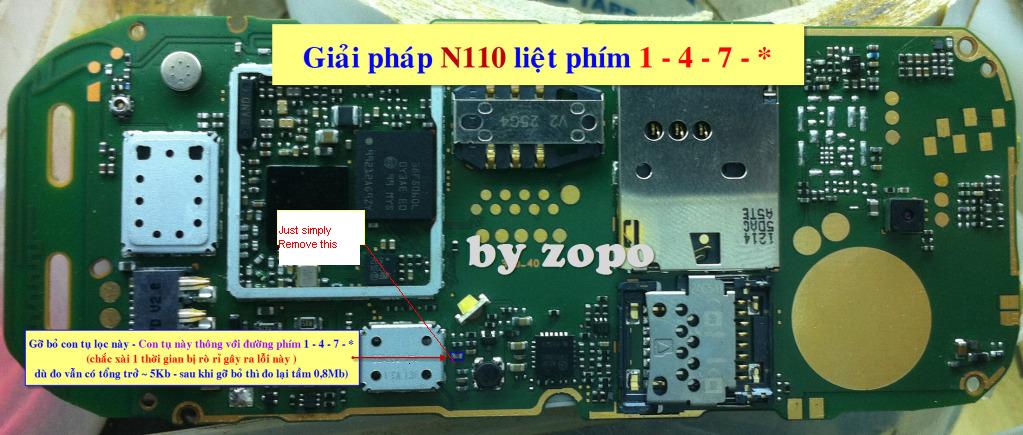
Nokia 110 keypad ic jumper 147 keys

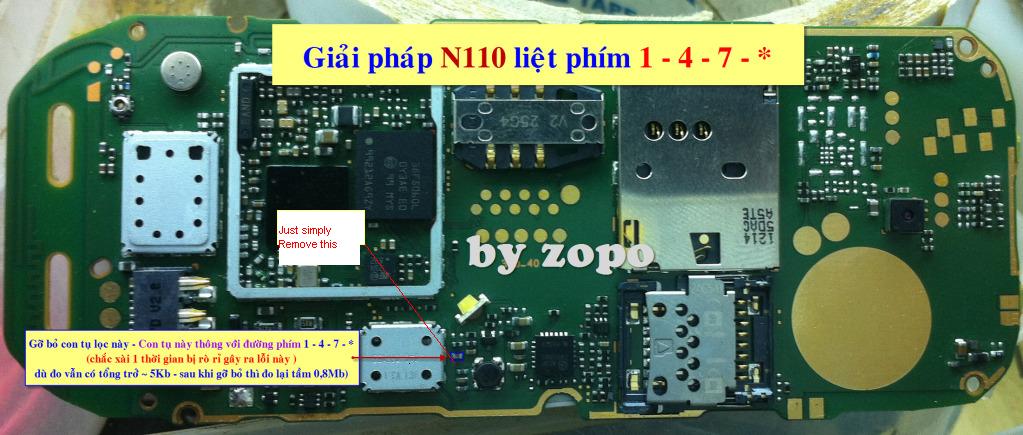
If 1,4,7 keys are not working in Nokia 110 then you can fix this keypad problem with diagram bellow. In this diagram you can see a capes-tor. This part can become short due to water damages and may cause for Nokia 110 keypad problem.
nokia 110 keypad ic jumper 147 keys
In first step try to make it clean with electronics cleaner and apply hot air so that it can be dry. Do not apply much heat because it can harm your skin and may can damage the mother board.