Nokia X201 Ringer Problem Solution Jumpers

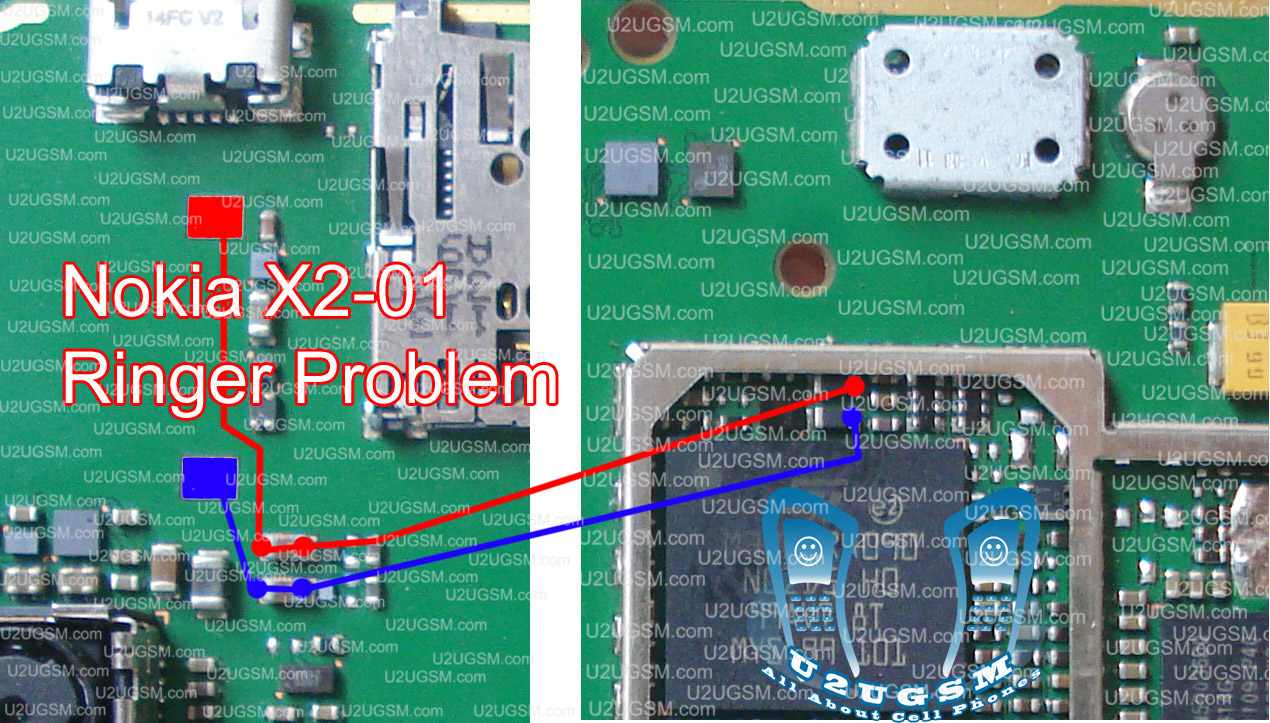
Nokia X201 Ringer Problem, Low Ringer Voice, Ringer not working and many more ringer related faults can be solve with diagram bellow. In this diagram you can see two color line one is blue and other is red.

Both of them is indicating path of circuit and you can follow them if there is any link broken you can apply jumper at those points. And can replace those parts that are infected by rust water damage or due to carbon. It will help you to solve ringer problem in Nokia x201.

For more detail and new tips and tricks about cellphone service problem keep visiting this page we will update cellphone service diagrams timely with new cellphone diagrams. Some related post are also given bellow you can read them also for more information about cell phone.
Nokia X201 On Off Button ways Power Problem

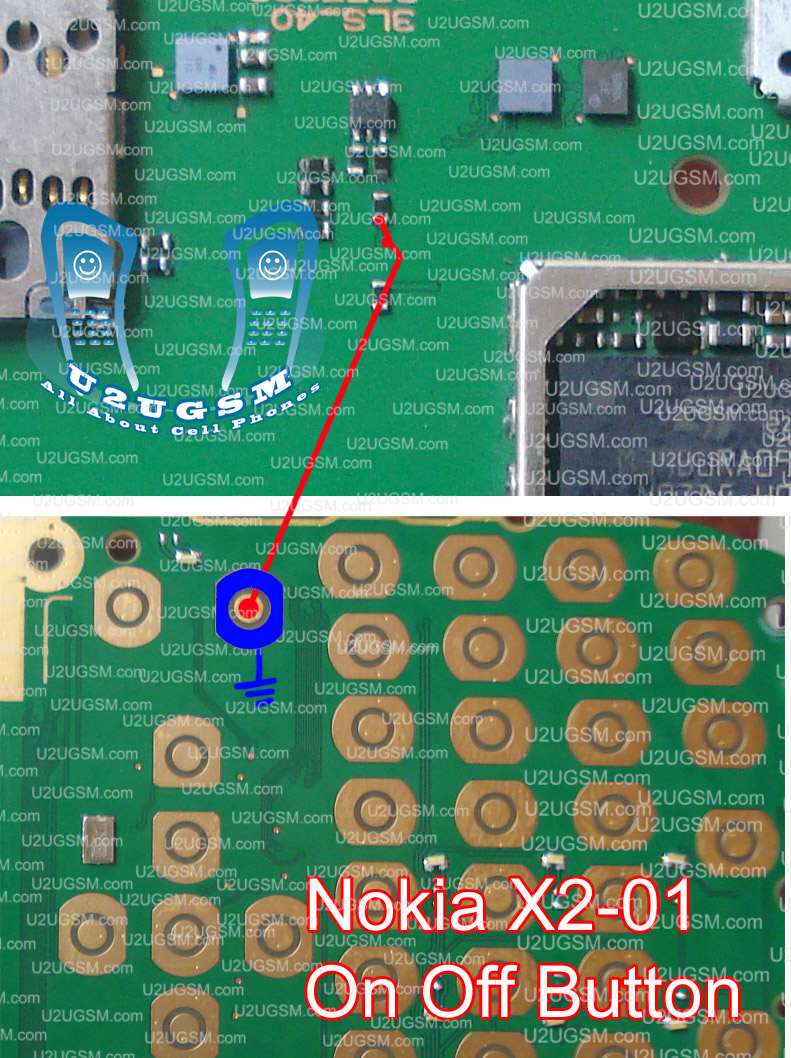
If Nokia X201 Got dead and do not power on but if you plug in charger it shows charging in normal condition it means set is working but power button on of switch is not working. Bellow diagram will teach you how to solve dead problem in Nokia x201 due to power button.

Look at diagram above and make jumpers as shown in diagram outer button is a ground print while inner is going to the point near MMC ic so make jumper at the same point as shown in diagram.

For more detail and new tips and tricks about cellphone service problem keep visiting this page we will update cellphone service diagrams timely with new cellphone diagrams. Some related post are also given bellow you can read them also for more information about cell phone.
Nokia 1661 Not Charging Problem Solution 100% Tested

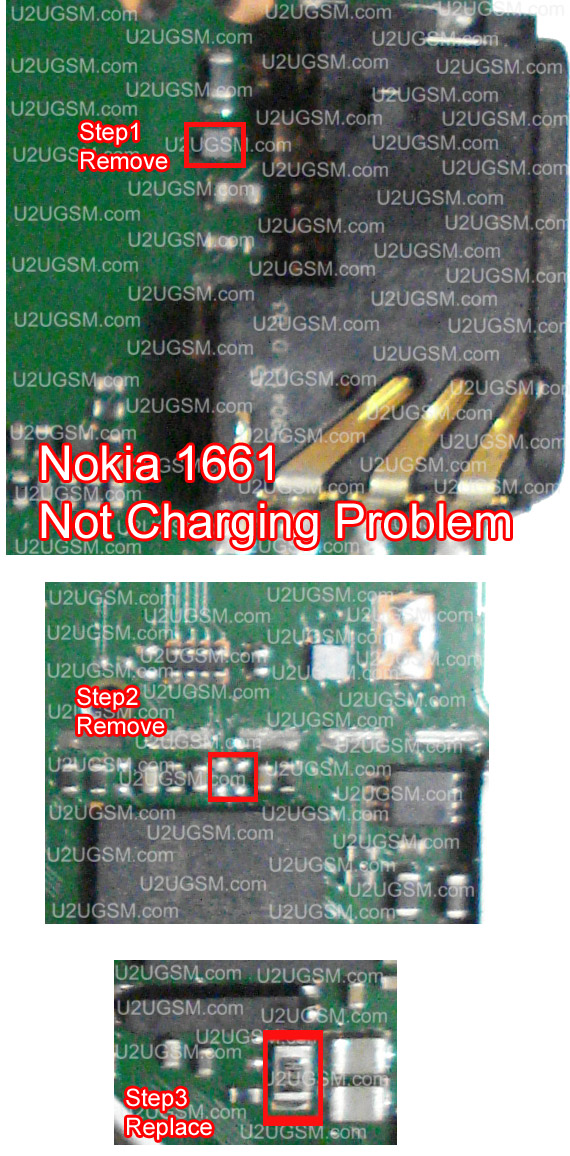
if you are facing not charging problem in Nokia 1661 then this diagram will help you to solve this issue in a few simple steps. First of all look at mother board carefully if there is some carbon rust or water damages. then do fowling steps as shown in diagram.

In First step remove charging ic near the charging base and then remove double resistance and at last replace R22. In all these steps do a single step and then plug in charger and check in these steps it should be ok it is tested 100ds of times and solve problem more then 90% of sets and if it can not solve it can be fault of uem.

If it do not shows any this when you plug in charger then it can be fault of some missing parts or discontinuity in circuit for this problem you can read my other post about Nokia 1661 Charging problem solution with jumpers.

for more detail and new tips and tricks about cellphone service problem keep visiting this page we will update cellphone service diagrams timely with new cellphone diagrams. some related post are also given bellow you can read them also for more information about cell phone.
Nokia 1203 Not Charging Problem Solution 100% Tested

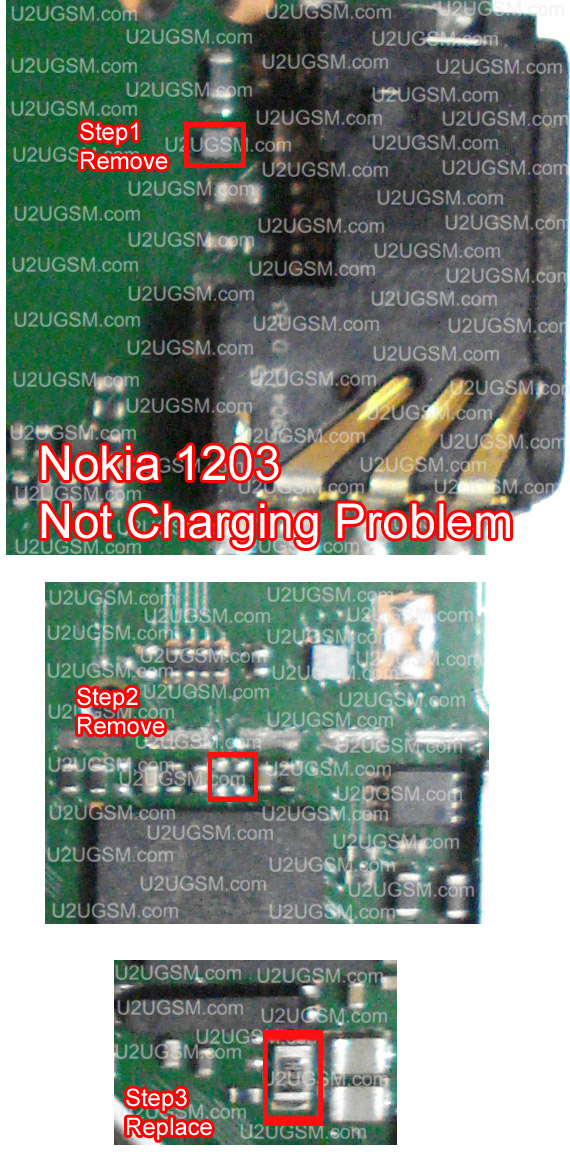
if you are facing not charging problem in Nokia 1203 then this diagram will help you to solve this issue in a few simple steps. First of all look at mother board carefully if there is some carbon rust or water damages. then do fowling steps as shown in diagram.

In First step remove charging ic near the charging base and then remove double resistance and at last replace R22. In all these steps do a single step and then plug in charger and check in these steps it should be ok it is tested 100ds of times and solve problem more then 90% of sets and if it can not solve it can be fault of uem.

If it do not shows any this when you plug in charger then it can be fault of some missing parts or discontinuity in circuit for this problem you can read my other post about Nokia 1203 Charging problem solution with jumpers.

for more detail and new tips and tricks about cellphone service problem keep visiting this page we will update cellphone service diagrams timely with new cellphone diagrams. some related post are also given bellow you can read them also for more information about cell phone.
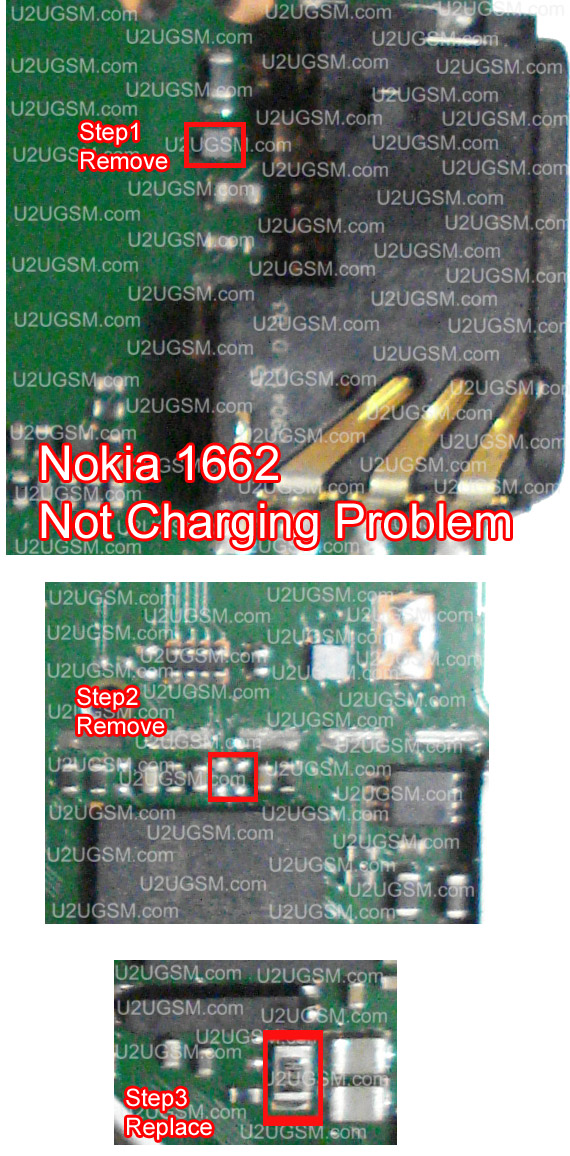
Nokia 1662 Not Charging Problem Solution 100% Tested

if you are facing not charging problem in Nokia 1662 then this diagram will help you to solve this issue in a few simple steps. First of all look at mother board carefully if there is some carbon rust or water damages. then do fowling steps as shown in diagram.

In First step remove charging ic near the charging base and then remove double resistance and at last replace R22. In all these steps do a single step and then plug in charger and check in these steps it should be ok it is tested 100ds of times and solve problem more then 90% of sets and if it can not solve it can be fault of uem.

If it do not shows any this when you plug in charger then it can be fault of some missing parts or discontinuity in circuit for this problem you can read my other post about Nokia 1662 Charging problem solution with jumpers.

for more detail and new tips and tricks about cellphone service problem keep visiting this page we will update cellphone service diagrams timely with new cellphone diagrams. some related post are also given bellow you can read them also for more information about cell phone.