Showing posts with label Touch Solution. Show all posts

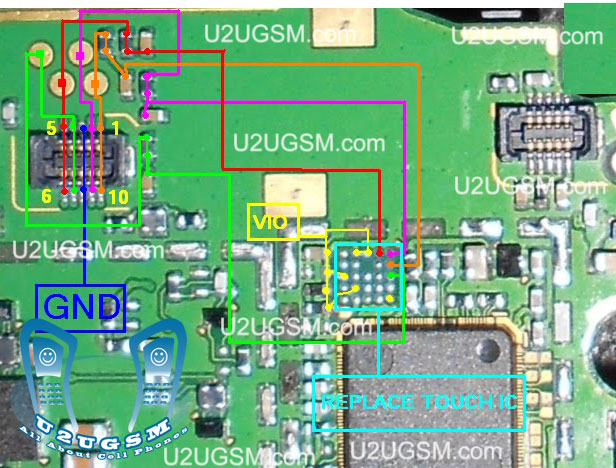
Nokia asha 305 touch screen problem solution

If Nokia asha 305 touch screen is not working we can not type with it.Although Nokia asha 305 have also keypad but touch screen is easy to type fast. To solve touch screen problem of Nokia asha I am posting this post that also have a diagram.
nokia asha 305 touch screen problem solution
The above diagram contains some different color lines these are used for Nokia asha 305 touchscreen function.You can find out if there is some rust carbon in it. Mother board can be water damage or may be you find out some burn parts in it.

Nokia Asha 203 Touch Screen Problem Solution IC

If Nokia asha 203 touch screen, touch pad is not working it can be due to damages, Water damages, Burning parts.This post will teach you about IC that is used in Nokia asha 203 touch screen function workings.
Nokia Asha 203 Touch Screen Problem Solution IC
You can use calibration settings for touch screen solution in Nokia asha 203. After dis assembly replace touch screen and if replacement of Nokia asha 203 touchscreen can not solve touch problem you can check this IC.

Touch screen ic is identified in this diagram with red lines Re sold this IC and Re flow the touchscreen IC. You may have to replace this Ic if Resoldering can not solve Touch screen in Nokia Asha 203.
for more detail and new tips and tricks about cellphone service problem keep visiting this page we will update cellphone service diagrams timely with new cellphone diagrams.some related post are also given bellow you can read them also for more information about cellphone.

Nokia Asha 203 Touch Screen Solution Jumpers Problem Ways

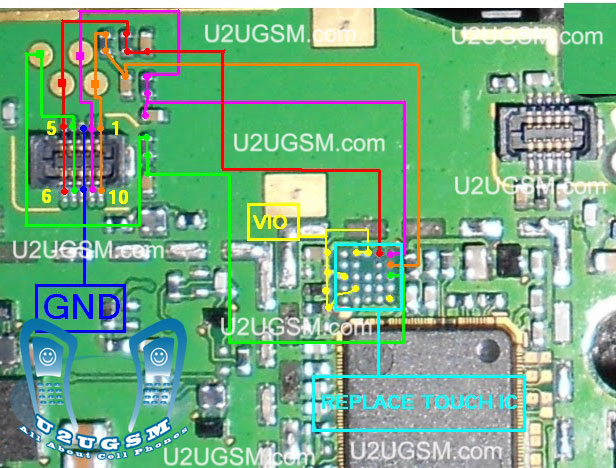
If Nokia asha 203 touch screen is not working we can not type with it.Although Nokia asha 203 have also keypad but touch screen is easy to type fast. To solve touch screen problem of Nokia asha I am posting this post that also have a diagram.
Nokia Asha 203 Touch Screen Solution Jumpers Problem Ways
The above diagram contains some different color lines these are used for Nokia asha 203 touchscreen function.You can find out if there is some rust carbon in it. Mother board can be water damage or may be you find out some burn parts in it.
In case of water damage clean the mother board and apply heat to make it dry. In case of burn or damage parts you can replace components.
Check all these tracks that are given in diagram for Nokia asha 203 touchscreen problem solutions.Small circles in different colors are given so that you can find out points where you can apply jumpers and you can check these with meter.
If any link is broken apply jumpers to solve touch screen solution in Nokia asha 203.
I all ready have posted an Nokia Asha 203 Touch screen IC problem solution you can check it also.
for more detail and new tips and tricks about cellphone service problem keep visiting this page we will update cellphone service diagrams timely with new cellphone diagrams.some related post are also given bellow you can read them also for more information about cellphone.

Nokia C5-06 touch screen problem solution jumpers

Nokia C5-06 touch screen touch pad problem can be cause of water damages, carbon, rust, burner, or damages of touch screen jack or glass.Look all parts in this diagram to solve Nokia C5-06 touch screen solution.
Nokia C5-06 touch screen problem solution jumpers
After dis assemble of Nokia C5-06 look at mother board and If you found some rust carbon or water damages then it can also be cause of Nokia C5-06 touchscreen problem to solve and fix touch screen problem in Nokia C5-06 clean all the rust and carbon with electronics cleaner and apply hot air to make it dry.

In above diagram some different color lines are given to identify tracks that are used in touch screen function of Nokia C5-06.Check all these path with meter and if any of them is missing apply jumpers.

Re sold and re follow of these parts can also solve touch screen problem in Nokia C5-06.

for more detail and new tips and tricks about cellphone service problem keep visiting this page we will update cellphone service diagrams timely with new cellphone diagrams.some related post are also given bellow you can read them also for more information about cellphone.

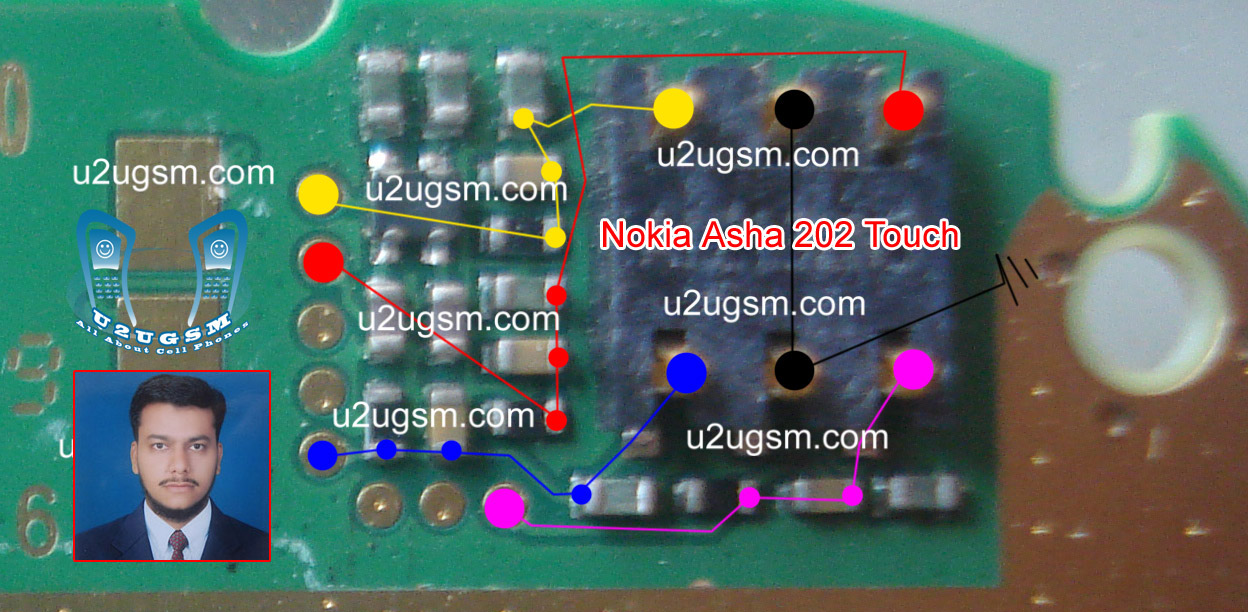
Nokia Asha 202 Touch Screen Solution Jumpers Problem Ways

If Nokia asha 202 touch screen is not working we can not type with it.Although Nokia asha 202 have also keypad but touch screen is easy to type fast. To solve touch screen problem of Nokia asha I am posting this post that also have a diagram.
Nokia Asha 202 Touch Screen Solution Jumpers Problem Ways
The above diagram contains some different color lines these are used for Nokia asha 202 touchscreen function.You can find out if there is some rust carbon in it. Mother board can be water damage or may be you find out some burn parts in it.
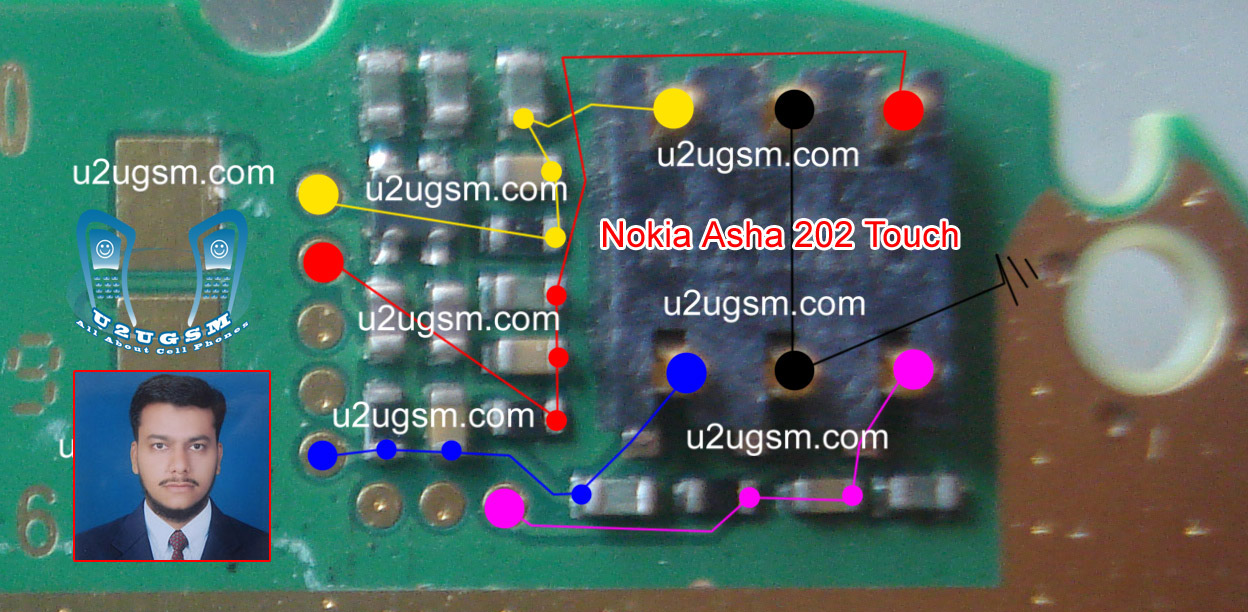
In case of water damage clean the mother board and apply heat to make it dry. In case of burn or damage parts you can replace components.
Check all these tracks that are given in diagram for Nokia asha 202 touchscreen problem solutions.Small circles in different colors are given so that you can find out points where you can apply jumpers and you can check these with meter.
If any link is broken apply jumpers to solve touch screen solution in Nokia asha 202.
I all ready have posted an Nokia Asha 202 Touch screen IC problem solution you can check it also.
for more detail and new tips and tricks about cellphone service problem keep visiting this page we will update cellphone service diagrams timely with new cellphone diagrams.some related post are also given bellow you can read them also for more information about cellphone.

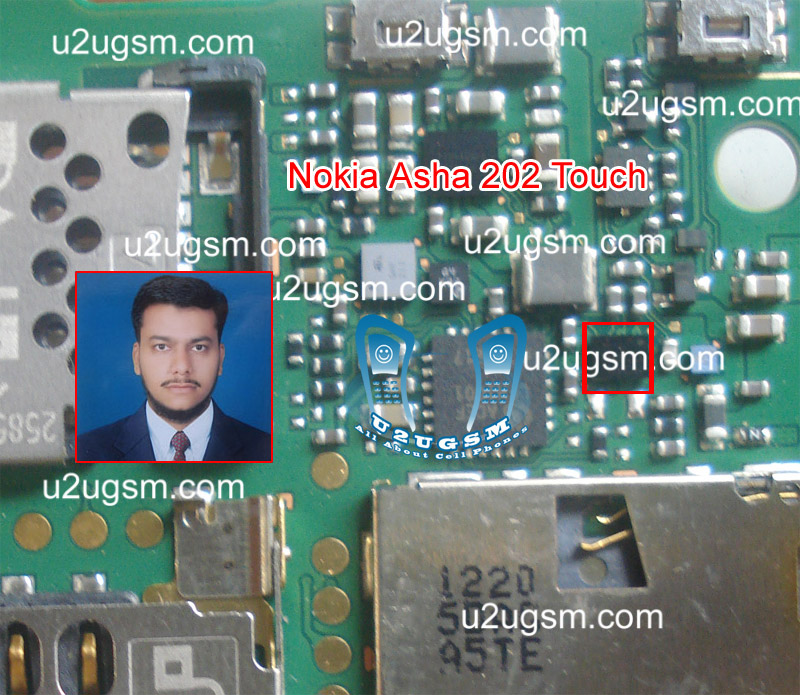
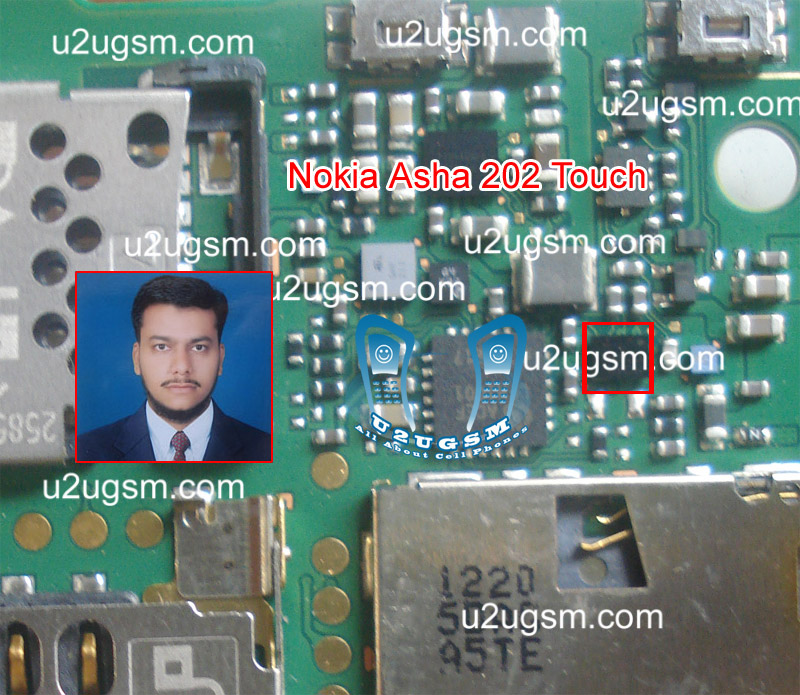
Nokia Asha 202 Touch Screen Problem Solution IC

If Nokia asha 202 touch screen, touch pad is not working it can be due to damages, Water damages, Burning parts.This post will teach you about IC that is used in Nokia asha 202 touch screen function workings.
Nokia Asha 202 Touch Screen Problem Solution IC
You can use calibration settings for touch screen solution in Nokia asha 202. After dis assembly replace touch screen and if replacement of Nokia asha 202 touchscreen can not solve touch problem you can check this IC.

Touch screen ic is identified in this diagram with red lines Re sold this IC and Re flow the touchscreen IC. You may have to replace this Ic if Resoldering can not solve Touch screen in Nokia Asha 202.
for more detail and new tips and tricks about cellphone service problem keep visiting this page we will update cellphone service diagrams timely with new cellphone diagrams.some related post are also given bellow you can read them also for more information about cellphone.

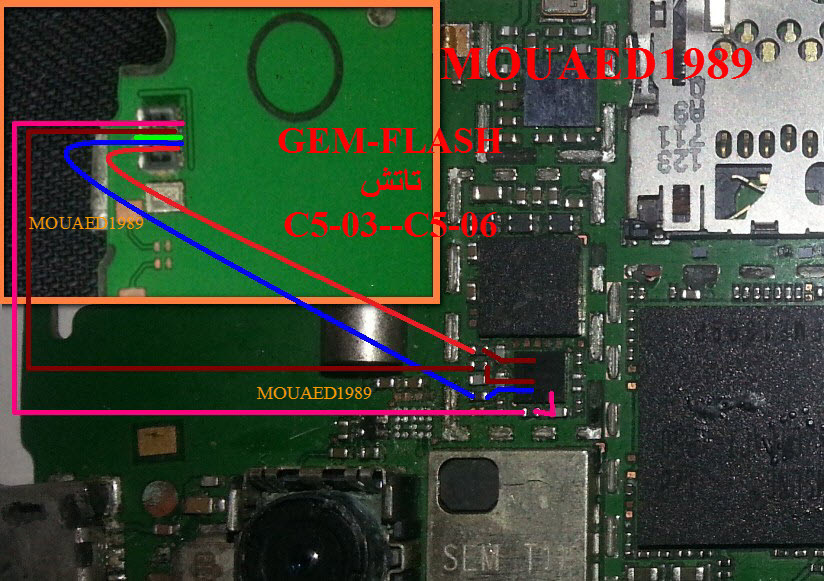
Nokia C5-03 touch screen problem solution jumpers

Nokia C5-03 touch screen touch pad problem can be cause of water damages, carbon, rust, burn, or damages of touch screen jack or glass.Look all parts in this diagram to solve Nokia C5-03 touch screen solution.
Nokia C5-03 touch screen problem solution jumpers
After dis assemble of Nokia C5-03 look at mother board and If you found some rust carbon or water damages then it can also be cause of Nokia C5-03 touchscreen problem to solve and fix touch screen problem in Nokia C5-03 clean all the rust and carbon with electronics cleaner and apply hot air to make it dry.

In above diagram some different color lines are given to identify tracks that are used in touch screen function of Nokia C5-03.Check all these path with meter and if any of them is missing apply jumpers.

Re sold and re follow of these parts can also solve touch screen problem in Nokia C5-03.

for more detail and new tips and tricks about cellphone service problem keep visiting this page we will update cellphone service diagrams timely with new cellphone diagrams.some related post are also given bellow you can read them also for more information about cellphone.

Nokia Asha 311 Touch is not working problem Solution Jumper Ways

As we know Nokia Asha 311 have keypad and touch screen both.So if you are facing touch screen problem in Nokia Asha 311 it can be solve with a few steps that i am going to describe in this post.Look at the diagram bellow and follow steps that are given in it.
In above diagram you can see touch pad jack and a few different color lines in it. In first step try calibration to solve touch screen problem if touch screen touch positions are not correct.
Nokia Asha 311 Touch is not working problem Solution Jumper Ways
If touch screen is totally not working you can replace with new one and if replacement of touch screen is not working that can be problem of touch pad ways.

In above diagram you can see touch pad tracks so check all these paths with meter and if any of them is missing apply jumpers as given in repairing diagram for Nokia Asha 311 touch screen.

for more detail and new tips and tricks about cellphone service problem keep visiting this page we will update cellphone service diagrams timely with new cellphone diagrams.some related post are also given bellow you can read them also for more information about cellphone.

Nokia Asha 303 Touch is not working problem Solution Jumper Ways

As we know Nokia Asha 303 have keypad and touch screen both.So if you are facing touch screen problem in Nokia Asha 303 it can be solve with a few steps that i am going to describe in this post.Look at the diagram bellow and follow steps that are given in it.
Nokia Asha 303 Touch is not working problem Solution Jumper Ways
In above diagram you can see touch pad jack and a few different color lines in it. In first step try calibration to solve touch screen problem if touch screen touch positions are not correct.

If touch screen is totally not working you can replace with new one and if replacement of touch screen is not working that can be problem of touch pad ways.

In above diagram you can see touch pad tracks so check all these paths with meter and if any of them is missing apply jumpers as given in repairing diagram for Nokia Asha 303 touch screen.

for more detail and new tips and tricks about cellphone service problem keep visiting this page we will update cellphone service diagrams timely with new cellphone diagrams.some related post are also given bellow you can read them also for more information about cellphone.

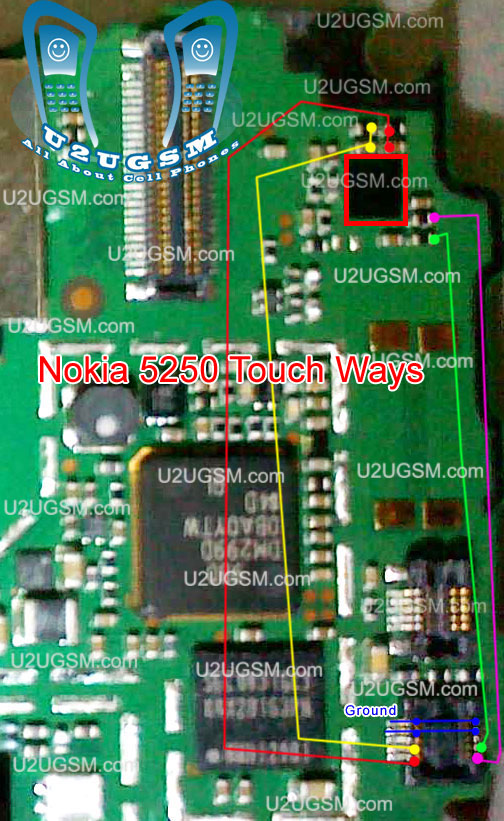
Nokia 5250 Touch Screen Problem Solution Jumper Ways

this diagram is about touch screen problem in Nokia 5250 . In case of touch screen problem we can not use any key and we can not manage keypad and mobile functions.to solve touch screen problem in Nokia 5250 you can follow a few steps as given bellow.


after dis assembling of Nokia 5250 check touch screen jack on board if there is some carbon or water damage then clean it with electronics cleaner and apply a light heat with hot air so that it can be dry.once its totally dry check touch screen.
if touch screen of Nokia 5250 will not be solve with above method check all track and parts as shown in above diagram.in diagram all tracks are given with different colors and you can easily find whole track and path.
if any path is damage or broken apply jumpers as shown and replace parts as given in diagram.

for more detail and new tips and tricks about cellphone service problem keep visiting this page we will update cellphone service diagrams timely with new cellphone diagrams.some related post are also given bellow you can read them also for more information about cellphone.

Nokia 5233 Touch Screen Problem Solution Jumper Ways

This diagram is about touch screen problem in Nokia 5233. In case of touch screen problem we can not use any key and we can not manage keypad and mobile functions.to solve touch screen problem in Nokia 5233 you can follow a few steps as given bellow.

after dis assembling of Nokia 5233 check touch screen jack on board if there is some carbon or water damage then clean it with electronics cleaner and apply a light heat with hot air so that it can be dry.once its totally dry check touch screen.
if touch screen of Nokia 5233 will not be solve with above method check all track and parts as shown in above diagram.in diagram all tracks are given with different colors and you can easily find whole track and path.
if any path is damage or broken apply jumpers as shown and replace parts as given in diagram.

for more detail and new tips and tricks about cellphone service problem keep visiting this page we will update cellphone service diagrams timely with new cellphone diagrams.some related post are also given bellow you can read them also for more information about cellphone.

Nokia 5230 Touch Screen Problem Solution Jumper Ways

this diagram is about touch screen problem in Nokia 5230. In case of touch screen problem we can not use any key and we can not manage keypad and mobile functions.to solve touch screen problem in Nokia 5230 you can follow a few steps as given bellow.

after dis assembling of Nokia 5230 check touch screen jack on board if there is some carbon or water damage then clean it with electronics cleaner and apply a light heat with hot air so that it can be dry.once its totally dry check touch screen.
if touch screen of Nokia 5230 will not be solve with above method check all track and parts as shown in above diagram.in diagram all tracks are given with different colors and you can easily find whole track and path.
if any path is damage or broken apply jumpers as shown and replace parts as given in diagram.

for more detail and new tips and tricks about cellphone service problem keep visiting this page we will update cellphone service diagrams timely with new cellphone diagrams.some related post are also given bellow you can read them also for more information about cellphone.

Nokia Asha 303 Touch Screen Panel Problem Jumpers Solution

If you are facing touch screen problem in Nokia asha 303 then this diagram below will help you to solve touchscreen problem in it.look at diagram bellow and in it you can find different color’s lines.

These multi color lines are defining path and track of touch screen panel in Nokia asha 303.in diagram a zoom image is also given so that you can understand which parts components are used in touch function.

So check these parts with electronics meter and if any link of them is broken apply that jumper to solve touch screen not working problem in Nokia asha 303.

for more detail and new tips and tricks about cellphone service problem keep visiting this page we will update cellphone service diagrams timely with new cellphone diagrams.some related post are also given bellow you can read them also for more information about cellphone.

Nokia Asha 303 Touch Screen Panel Problem Jumpers Solution

If you are facing touch screen problem in Nokia asha 303 then this diagram bellow will help you to solve touchscreen problem in it.look at diagram bellow and in it you can find different color’s lines.

These multi color lines are defining path and track of touch screen panel in Nokia asha 303.in diagram a zoom image is also given so that you can understand which parts components are used in touch function.

So check these parts with electronics meter and if any link of them is broken apply that jumper to solve touch screen not working problem in Nokia asha 303.

for more detail and new tips and tricks about cellphone service problem keep visiting this page we will update cellphone service diagrams timely with new cellphone diagrams.some related post are also given bellow you can read them also for more information about cellphone.

Nokia Asha 303 Touch Screen Panel Problem Jumpers Solution

If you are facing touch screen problem in nokia asha 303 then this diagram bellow will help you to solve touchscreen problem in it.look at diagram bellow and in it you can find different color’s lines.

These multi color lines are defining path and track of touch screen panel in nokia asha 303.in diagram a zoom image is also given so that you can understand which parts components are used in touch function.

So check these parts with electronics meter and if any link of them is broken apply that jumper to solve touch screen not working problem in nokia asha 303.

for more detail and new tips and tricks about cellphone service problem keep visiting this page we will update cellphone service diagrams timely with new cellphone diagrams.some related post are also given bellow you can read them also for more information about cellphone.