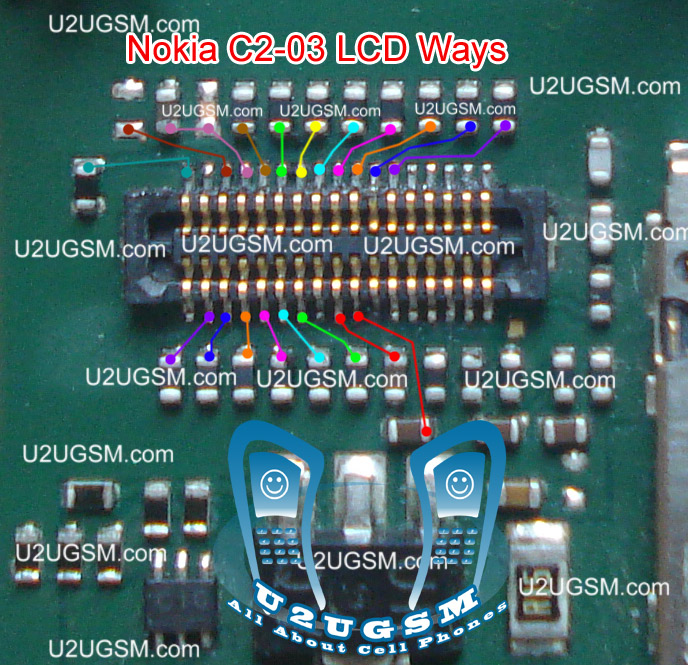
Nokia C2-02 LCD Display Problem Solution Ways Jumpers

Problem:-
Nokia C2-02 Blank LCD Display, Nokia C2-02 White LCD Display, Nokia C2-02 LCD Jack Damage Prints Missing.
Tools:-
To solve LCD display problem in Nokia C2-02 we have required a few tools and components.
Nokia screw Driver t5 and t4 for opening screw .
LCD panel for Nokia C2-02
Electronics Cleaner for rust or water damage.
Hot air to dry the mother board.
LCD Jack if we have to replace it.
Nokia C2-02 Lcd Display Problem Solution Ways Jumpers

Diagnostics & Solution:
After disassemble of Nokia C2-02 remove LCD and check LCD jack and its near by area for rust or water damages.
If here is some carbon on parts or at LCD jack.
Apply electronics cleaner and dry it with hot air for a few mint.
Do not apply so much heat it can harm your skin and mother board parts also.
Check with LCD and if it is still blank replace with new one.
It might be possible that LCD jack pins are missing or not getting connected with LCD so change it.
Check all these links as given in above diagram in different colors so that you can find them easily.

Warnings:
Do not apply to much heat it can damage the mother board.
Make sure mother board is dry proper when you apply electronics clean.
Check LCD jack and when removing it make sure solder has been melt.
If solder has not proper melt and you try to remove LCD jack prints might be damage.
When you replace LCD make sure LCD strip is proper fixed.
It can be damage when you assemble the phone if not in proper place.

for more detail and new tips and tricks about cellphone service problem keep visiting this page we will update cellphone service diagrams timely with new cellphone diagrams.some related post are also given bellow you can read them also for more information about cellphone.
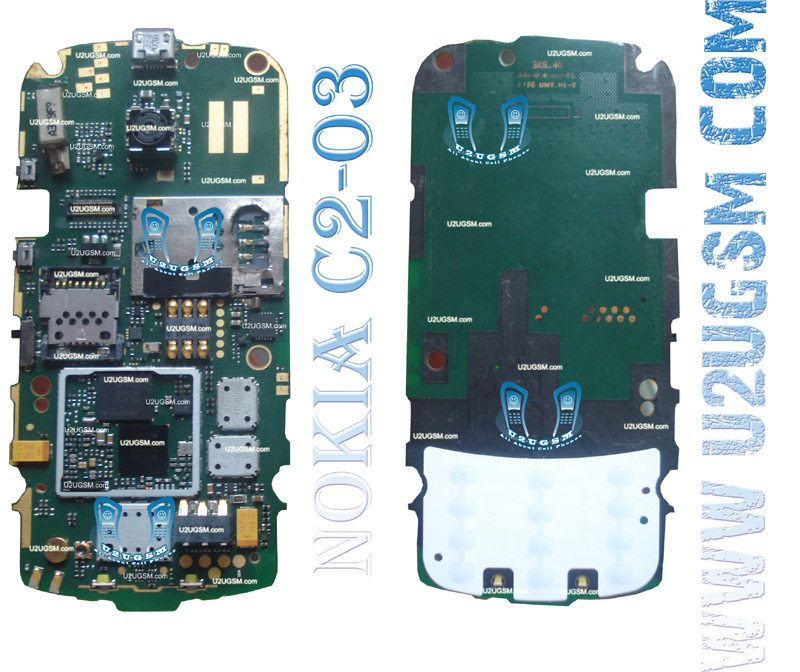
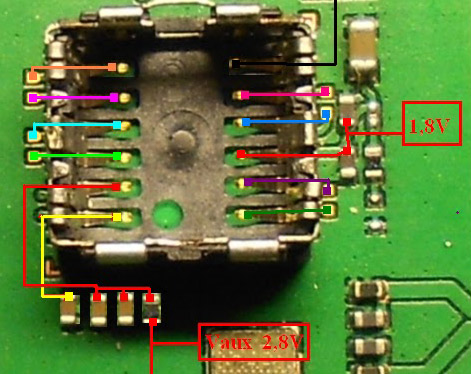
Nokia C2-06 Full PCB Diagram Mother Board Layout


 Nokia C2-06 Full PCB cellphone Diagram Mother Board Layout.
Here is the cellphone diagram of Nokia C2-06 PCB.so i will add some more cellphone diagram in high resolution so that you can add some more repairing trick for
Nokia C2-06 Full PCB Diagram Mother Board Layout-m

High Resolution


Download High Resolution Diagram of Nokia C2-06


Nokia C2-06 if you find some new repairing techniques please must email me and i will post that diagram with your reference in this way we all make it possible "REPAIRING MADE EASY"

Thanks
for more detail and new tips and tricks about cellphone service problem keep visiting this page we will update cellphone service diagrams timely with new cellphone diagrams.some related post are also given bellow you can read them also for more information about cellphone.

Nokia C2-08 Camera Standby Not working Problem Solution Jumper Ways

Nokia C2-08 Camera Problem, Nokia C2-08 Camera Standby Mode can be cause of water damage or breakage. To solve this problem in the mobile phone you can follow a few steps that i am going to describe in this post.
Nokia C2-08 Camera Standby Notworkin Problem Solution Jumper Ways
In first step restore factory setting in Nokia C2-08. Then make a full flash (software firmware) installation. And the third step is to check hardware diagnostics. After dis assembly of phone check the whole mother board carefully.If there is some rust or carbon on board then clean it with electronics cleaner and apply some heat with hot air. So that the mother board can be dry.
If mother board can not be full dry it can create carbon in future so keep in mind it should be dry.Do not apply much heat as it can harm your skin and mother board of cell phone.
In above diagram as you can see there are different color lines. These lines are indicating tracks that are used in camera function so check these paths and apply jumpers as shown in above diagram.

for more detail and new tips and tricks about cellphone service problem keep visiting this page we will update cellphone service diagrams timely with new cellphone diagrams.some related post are also given bellow you can read them also for more information about cellphone.
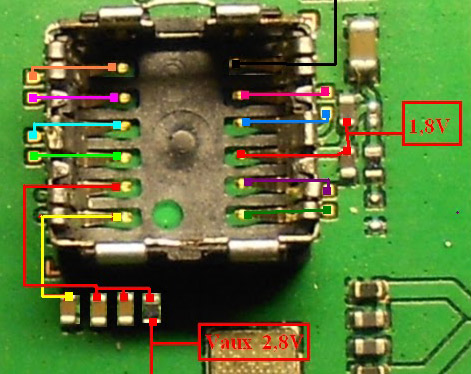
Nokia C2-07 Camera Standby Not working Problem Solution Jumper Ways

Nokia C2-07 Camera Problem, Nokia C2-07 Camera Standby Mode can be cause of water damage or breakage. To solve this problem in the mobile phone you can follow a few steps that i am going to describe in this post.
Nokia C2-07 Camera Standby Not working Problem Solution Jumper Ways
In first step restore factory setting in Nokia C2-07. Then make a full flash (software firmware) installation. And the third step is to check hardware diagnostic. After dis assembly of phone check the whole mother board carefully.If there is some rust or carbon on board then clean it with electronics cleaner and apply some heat with hot air. So that the mother board can be dry.
If mother board can not be full dry it can create carbon in future so keep in mind it should be dry.Do not apply much heat as it can harm your skin and mother board of cell phone.
In above diagram as you can see there are different color lines. These lines are indicating tracks that are used in camera function so check these paths and apply jumpers as shown in above diagram.

for more detail and new tips and tricks about cellphone service problem keep visiting this page we will update cellphone service diagrams timely with new cellphone diagrams.some related post are also given bellow you can read them also for more information about cellphone.

Nokia C2-06 Camera Standby Not working Problem Solution Jumper Ways

Nokia C2-06 Camera Problem, Nokia C2-06 Camera Standby Mode can be cause of water damage or breakage. To solve this problem in the mobile phone you can follow a few steps that i am going to describe in this post.
Nokia C2-06 Camera Standby Not working Problem Solution Jumper Ways
In first step restore factory setting in Nokia C2-06. Then make a full flash (software firmware) installation. And the third step is to check hardware diagnostic. After dis assembly of phone check the whole mother board carefully.If there is some rust or carbon on board then clean it with electronics cleaner and apply some heat with hot air. So that the mother board can be dry.
If mother board can not be full dry it can create carbon in future so keep in mind it should be dry.Do not apply much heat as it can harm your skin and mother board of cell phone.
In above diagram as you can see there are different color lines. These lines are indicating tracks that are used in camera function so check these paths and apply jumpers as shown in above diagram.

for more detail and new tips and tricks about cellphone service problem keep visiting this page we will update cellphone service diagrams timely with new cellphone diagrams.some related post are also given bellow you can read them also for more information about cellphone.